


Neural guitar amp · VST3, AU and standalone · Windows & macOS
SMASHPLATE 2Neural Guitar Amp Simulator
Your NAM captures, or thousands of tones from TONE3000 right inside the plugin, on three amp channels you switch without a gap. Pedals, a cab with four IRs and studio effects around them: everything a guitarist needs to get from a DI to a finished tone. Rebuilt from scratch, so every capture sounds like the amp it came from.
- Windows 10 / 1164-bit · VST3 and standalone, ASIO
- macOS 11 or newerApple Silicon (M1 or later) · VST3, AU, standalone
- Any DAWthat loads VST3 or AU plugins
Free update for every SMASHPLATE owner. Version 2 is already in your downloads: open your order in your account or the download link in your order e-mail.

Three independent channels
Three complete rigs, ready at the same time
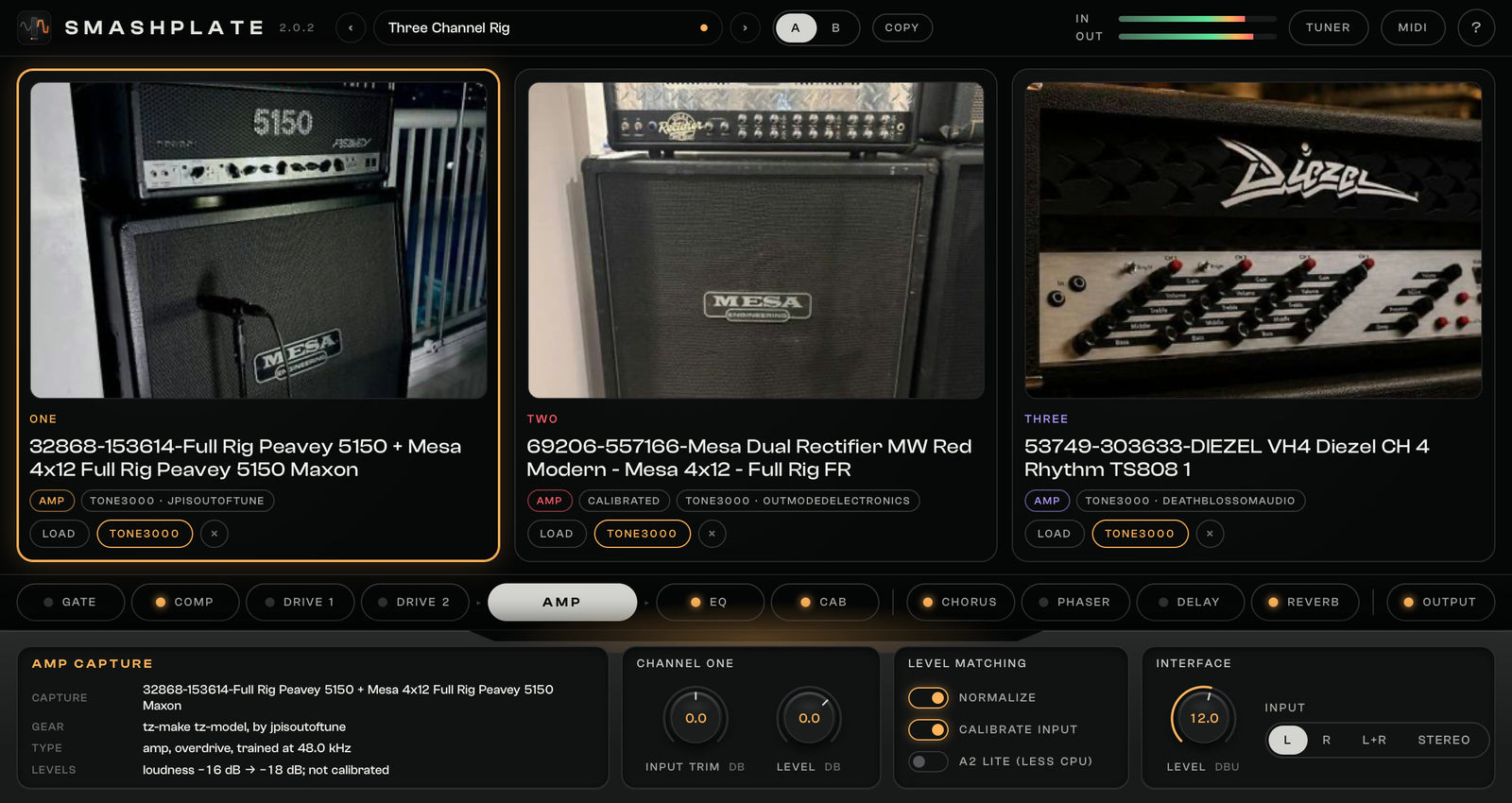
Each channel is a whole rig of its own, with its own settings: clean, rhythm and lead stay loaded and ready. The effects after them are shared, and each effect is on or off per channel.
Channel Onefor example Clean
- Input trim
- Gate and compressor
- Drive 1built-in drive or your pedal capture
- Drive 2built-in drive or your pedal capture
- Amp captureyour NAM file or a TONE3000 tone
- EQfive bands, sweepable mid
- Cabup to four IRs blended
- Channel level
Channel Twofor example Rhythm
- Input trim
- Gate and compressor
- Drive 1built-in drive or your pedal capture
- Drive 2built-in drive or your pedal capture
- Amp captureyour NAM file or a TONE3000 tone
- EQfive bands, sweepable mid
- Cabup to four IRs blended
- Channel level
Channel Threefor example Lead
- Input trim
- Gate and compressor
- Drive 1built-in drive or your pedal capture
- Drive 2built-in drive or your pedal capture
- Amp captureyour NAM file or a TONE3000 tone
- EQfive bands, sweepable mid
- Cabup to four IRs blended
- Channel level
Shared effectseach one on or off per channel, their tails ring on when you switch
- Chorus
- Phaser
- Delay
- Reverb
- Output and safety limiter
Gapless switching
Switch channels without a gap
When you switch, the new channel starts playing along with you in the background while the old one still sounds. After about a tenth of a second the two crossfade in 20 ms at steady loudness. No gap, no click, no dropout, and your delay and reverb ring on.
- Every cab is ready. The IRs of all three channels are already loaded, so you never hear the previous channel’s cab after a switch.
- Switch your way. Click a channel, automate it in your DAW, or send MIDI program change 1, 2 or 3 from your footswitch.
What you hear Silence and the old cab for a moment
What you hear New channel warms up, unheard 20 ms crossfade
Old channel New channel You switch
Control and automation
Play it with your feet, automate it in your DAW
Every knob and switch in SMASHPLATE 2 shows up in your DAW by name, the knobs with their unit, and any knob can follow a MIDI controller. Switch channels from a footswitch, ride the delay with an expression pedal, draw the rest in your automation lanes.
Channels from a footswitch
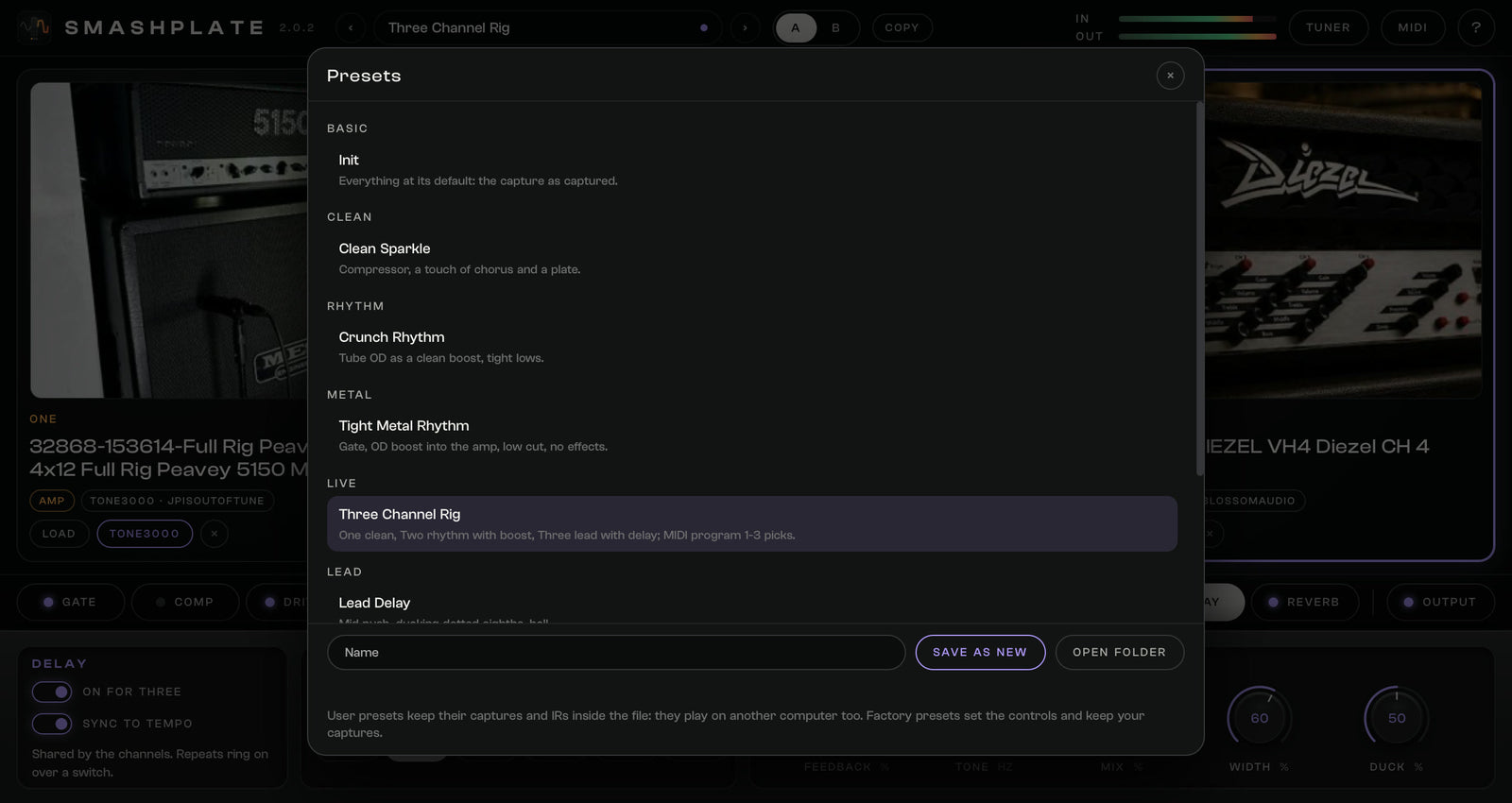
Send MIDI program change 1, 2 or 3 from a footswitch controller or a MIDI track and SMASHPLATE switches to channel One, Two or Three, without a gap, exactly like a click. The factory preset Three Channel Rig is set up for it.
MIDI learn on any knob
Press MIDI, click a knob, then move a knob, fader or expression pedal on your controller. That is it: the knob follows it and shows its controller number. Your assignments are saved with your project, and a right-click frees a knob again.
Automation lanes you can read
All 168 controls appear in your DAW by name, the knobs with their unit, like “Ch1 Bass” in dB or “Delay Mix” in %. Draw them or record your moves in touch mode, and the knobs on screen follow the automation as it plays.
- 168named controls, knobs with their unit
- PC 1-3switch channels One, Two, Three
- Any CClearned by any knob
- A / Bcompare two whole settings
New in SMASHPLATE 2
Rebuilt from scratch, around the sound
A new engine, a new design and the features guitarists asked for. Your SMASHPLATE projects and presets open in it.
Free update for every SMASHPLATE owner
Bought SMASHPLATE? Version 2 costs you nothing. It is already in the downloads of the order you bought it with.
- 1Open your downloadsYour order in your account, or the download link in your order e-mail. Pick the files named SMASHPLATE 2.0.0.
- 2Install over version 1The installer replaces SMASHPLATE 1 in place. Your DAW finds the same plugin.
- 3Open your projectsYour songs open with their captures and IRs, and your own presets show up in the preset list, ready to load.
The rig
From your DI to a finished tone, in one plugin
Every channel has its own pedals, amp, EQ and cab. The effects after it are shared, and each one can be on or off per channel.
- Gate
- Comp
- Drive 1
- Drive 2
- Amp capture
- EQ
- Cab
- Chorus
- Phaser
- Delay
- Reverb
- Output

TONE3000
Thousands of tones, one click from your track
Press TONE3000 on a channel or a drive slot and the browser opens right in the plugin. Search, filter by amp, amp with cab or pedal, sort by what is trending, and load the model you want. Your favorites and your own uploads are one click away, and every tone shows who made it and under which licence. Downloads are kept on your computer, so your projects open offline.
Three channels
Clean, rhythm and lead, ready at the same time
Each channel holds its own amp capture, pedals, EQ and cab. Switch from the cards, from your DAW’s automation or with MIDI program change 1, 2 and 3 from your foot controller: the new channel is warmed up before you hear it, so there is no gap. Normalize keeps every capture at the same loudness, so a new capture never jumps out.

Pedals
Your own pedal, or a better built-in drive
Each channel has two drive slots in front of the amp. Load a NAM capture of your own overdrive, or use the built-in Tube OD and Distortion: they react to your picking like the real pedals and stay smooth on high notes. A gate and a compressor sit in front of them.
Cab
Four IRs, one cab
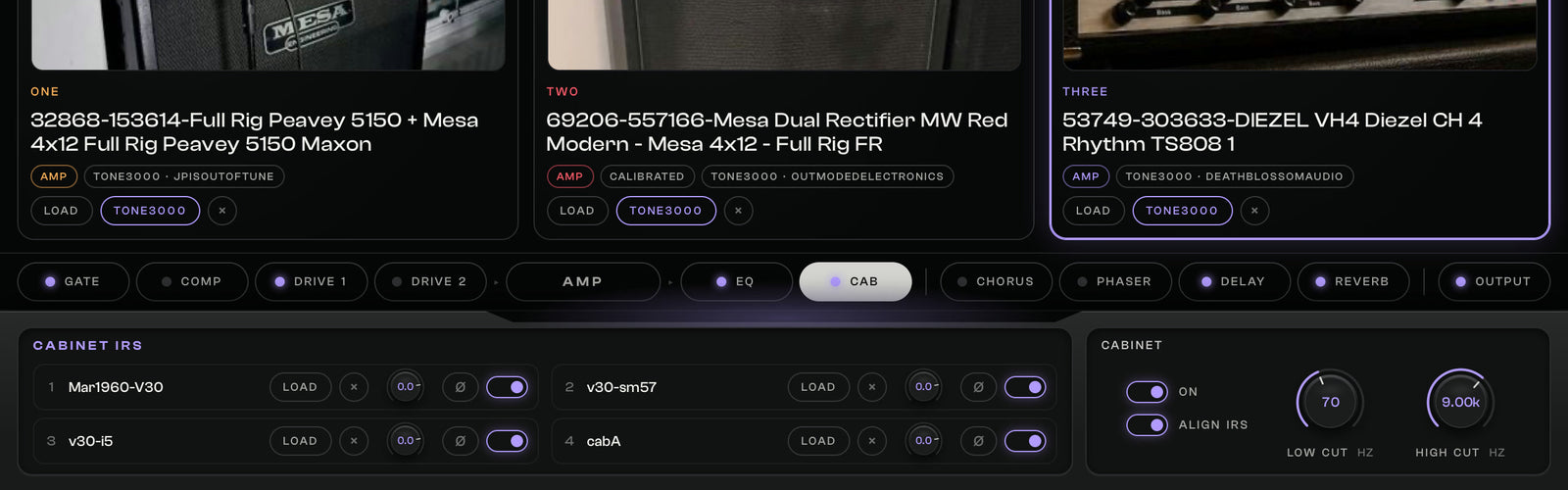
Blend up to four IRs per channel, each with its level, on/off and polarity. SMASHPLATE matches their loudness when they load, so a blend never gets louder by itself, and Align lines up IRs from different packs. A capture that already has its cab inside turns the cab off for you.
Effects
Studio effects that stay out of your way
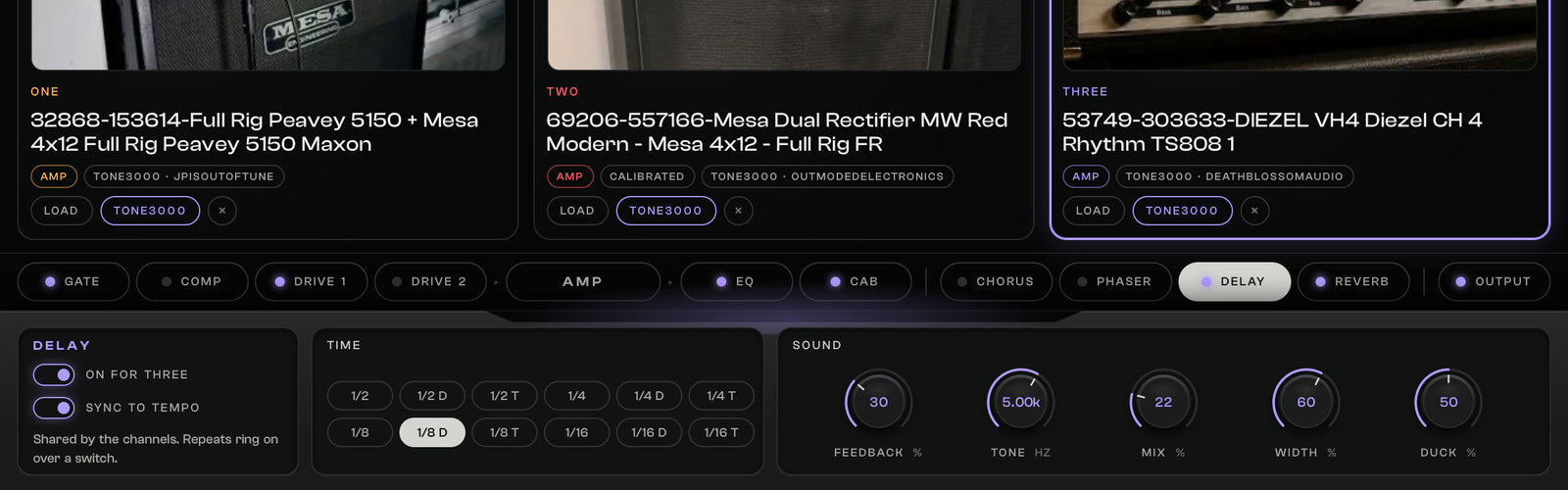
Chorus and phaser, a tempo-synced stereo delay that steps back while you play and comes back between phrases, and a Room, Plate or Hall reverb. Their tails ring on when you switch channels, and a safety limiter at the output keeps every peak in check.
Presets
Presets you can take anywhere
Eight factory presets get you started. Your own presets keep their captures and IRs inside the preset file, so they play on another computer or after you moved your files. A / B compares two whole settings, and Copy brings one side to the other.
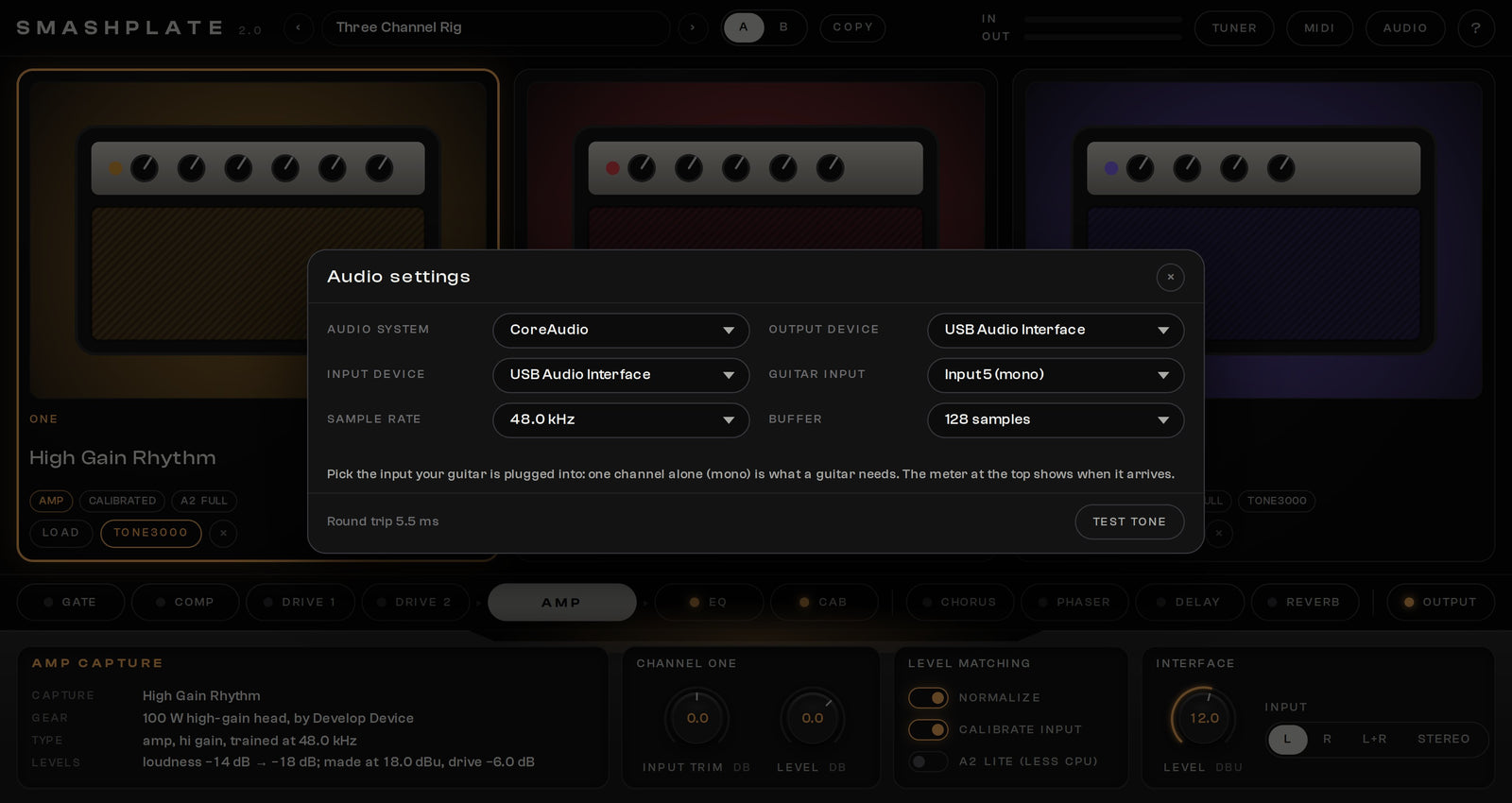
Standalone app
Plug in and play, no DAW needed
The standalone app picks your interface, sample rate and buffer, and offers every input of your interface on its own, so a multi-channel interface just works. An input meter shows that your guitar arrives, and a hint tells you when nothing comes in. ASIO on Windows, Core Audio on the Mac. A tuner is built in.
In your download
Four tone packs to start with
SMASHPLATE 2 comes with amp captures and cab IRs of ours, so you can play the first minute after you install it.
- Deftones: NAM A2 ProfilesHeavy rhythm tones in the style of Stephen Carpenter
- Djenty: NAM ProfilesTight, aggressive modern metal and djent
- Basstard: NAM ProfilesBass captures with weight, punch and clarity
- MESSI II IR Pack4x12 cab IRs with several mics and pairings
Delivery and compatibility
In your DAW and on its own
- Formats
- VST3, AU and standalone
- Windows
- Windows 10 / 11, 64-bit · VST3 and standalone app with ASIO
- macOS
- macOS 11 or newer, Apple Silicon (M1 or later) · VST3, AU and standalone app
- Not supported
- AAX (Pro Tools)
- Captures
- Your own NAM captures (.nam: A1, A2 and custom) and TONE3000 tones; amps, amps with cabs and pedals
- IRs
- Your own WAV cab IRs, up to four per channel
- In the download
- Windows installer, macOS installer, User Guide (PDF) and four tone packs
- Owners of SMASHPLATE 1
- Free update: version 2 is in the downloads of your original order, installs over version 1 and opens your projects
- Licence
- One-time purchase, instant download, no activation; included in the All-Access Pass
Questions
Frequently asked
What is SMASHPLATE 2?
A neural guitar amp simulator for your DAW and as a standalone app. You load NAM captures of real amps (your own files or tones from TONE3000, right inside the plugin) on three channels, and SMASHPLATE gives them the pedals, a cab with four IRs and the effects around them, so you get from a DI to a finished guitar tone in one plugin.
I own SMASHPLATE. Do I have to pay for version 2?
No. SMASHPLATE 2 is a free update for every SMASHPLATE owner. It is already in the downloads of your original order: open the order in your account or use the download link in your order e-mail, and pick the files named SMASHPLATE 2.0.0. The installer replaces version 1 in place.
What is new in version 2?
It was rebuilt from scratch. The TONE3000 browser is inside the plugin, every capture plays exactly the way it was made at any project sample rate, calibrated input drives captures like the real amp, channels switch without a gap, the drive slots take NAM pedal captures or new built-in drives, the cab blends four IRs at matched loudness, presets carry their captures and IRs, and the Windows app works with ASIO interfaces.
Will my SMASHPLATE 1 projects and presets still work?
Yes. Version 2 installs over version 1 and your projects open with their captures, IRs and settings. Your own presets appear in the preset list under SMASHPLATE 1 and are converted when you load them. Version 2 has no separate power amp section, because a NAM capture already contains its power amp, so a project that used it now sounds closer to the capture itself.
Which captures can I load?
Any NAM capture (.nam file): A1, A2 and custom models, amps, amps with a cab and pedals. Load your own files or browse TONE3000 inside the plugin. A2 captures can run in a lighter mode that saves CPU. A capture that already includes its cab turns the cab section off for you.
How does the TONE3000 browser work?
Press TONE3000 on a channel or a drive slot and sign in with your TONE3000 account in your web browser. Then search, filter by amp, amp with cab or pedal, and load a model straight into that slot. Your favorites and your own uploads are there too, and downloads stay on your computer, so your projects open offline.
Which DAWs and systems does it run on?
Any DAW that loads VST3 plugins, and Audio Units on a Mac (Logic Pro, for example). Windows 10 or 11 (64-bit) and macOS 11 or newer, Apple Silicon (M1 or later). There is also a standalone app for both systems. AAX for Pro Tools is not available.
My standalone app gets no input signal. What do I do?
Open the audio settings in the app, pick your audio interface and then the input your guitar is plugged into: every input of your interface is offered on its own. The input meter shows when your guitar arrives. On Windows, choose the ASIO driver of your interface for the lowest latency.
Does SMASHPLATE need an activation or an internet connection?
No activation and no licence key: install it and play. An internet connection is only needed to browse and download tones from TONE3000.
What is in the download?
The Windows installer, the macOS installer, the User Guide (PDF) and four tone packs to start with: Deftones NAM A2 profiles, Djenty NAM profiles, Basstard bass NAM profiles and the MESSI II IR pack.
SMASHPLATE 2
Your DI in. A finished guitar tone out.
Develop Device All-Access Pass
Why buy one plugin at a time?
One annual pass unlocks the entire Develop Device catalogue, plugins, presets, DAW templates, drum MIDI, cabinet IRs and amp profiles, including this product, plus everything new I release this year. A fraction of buying it piece by piece.
- Every Develop Device plugin & app, including this one
- Serum 2 & Vital synth preset toolkits
- Superior Drummer 3, EZdrummer, GGD, MODO & Addictive Drums presets
- DAW templates for Cubase, Studio One & Reaper, plus 30K+ drum MIDI
- Cabinet IRs, NAM profiles & presets for Fractal, Kemper & Ampero
- Quad Cortex captures, shared straight to your Cortex Cloud
- Every new Develop Device release during your active year
- What you unlock stays downloadable, even after your year ends