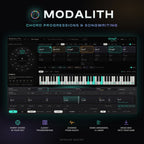
MODALITH
Version 1.1.7
Download for MacmacOS · Universal · 106.9 MB
Download for WindowsWindows · x64 · 18.1 MB
Your cart is empty
Continue shoppingBestsellers this week
Harmony & composition · VST3 · AU · Standalone
 Chord Progression Plugin
Pick a key and see every chord that belongs to it, coloured by what it does. Build a progression while the next chord lights up, or start from more than 2,000 progressions and the real chords of 1,045 famous songs. Then turn it into a song with chords, bass, melody and arpeggio on your own instruments, and drag it into your DAW.
One-time purchase · Instant download · Included in the All-Access Pass
Download without signing in or checking out. Enable it after installing.
Download any installer for Mac or Windows. No account, order or payment is needed to download.
Version 1.1.7
After installing, sign in to the Plugins & Apps Manager to enable a purchased license or start a free 7-day trial. Downloading and installing do not start the trial.
The product works once it is enabled with a valid license. The 7-day trial begins the first time you enable it and ends at the same time on both computers.
Already installed the Manager? Open it, sign in, select your product and choose Enable.
Browse all plugin installersOr get every plugin and app with Plugin Pass from 315,00 Kč a month.

How it works
Start wherever you are: a riff under your fingers, a recording, a style you love or an empty page.
Tutorial
A tour of the real plugin, from the first chord to a whole song dragged into your DAW as MIDI.

Chords in the key
Pick a key on the circle of fifths and its chords line up in a row, each with its Roman numeral and its role: home, moving away or pulling back. Below them sit the colour chords songs use all the time: chords borrowed from the minor or major key, chords that lead into another one, and more. Click a card to hear it, double-click or drag it to add it.

The Guide
While you play, the chords that could come next pulse in their own colour right on the palette. The strongest move pulses most and wears a 1, the next two pulse gently, the rest glow softly. Below, Next in shows the same choices for the style you pick, from pop and rock to jazz, gospel or trap, and tells you why when you point at one.

Colours and variations
Give the whole palette a colour: sus2, sus4, add9 or 6 on top of triads, sevenths or ninths. Right-click any chord for its variations, such as 7sus4, 6/9, m(add9) or maj7#11, the ones in your key first. Point to hear one, click to add it or to swap the chord you selected. A dashed card tells you the colour steps outside the key.

Progression library
21 styles and 26 families: jazz turnarounds, blues forms, four-chord pop loops, intros, key changes and many more. Search by name, style or mood, star your favourites, save your own progressions and find more like the one you love. Every card has variants: written out longer, half or double time, another voicing or rhythm. Drag any of them straight into your song.

Songs
Chart hits from the late 1950s to the 2000s, rock classics and jazz standards, each with its verse, chorus, bridge or whole form and the real rhythm of the chord changes. Search by song or artist, filter by genre and decade, and hear it in your key or the original one. Add it to your song or drag it into the timeline, then make it your own.

Generate
Choose a style, a mood, a length and how rich the chords should be, and press Listen first to hear a new progression without touching yours. Like it? Generate keeps exactly that one. Make it loop back to the start, or end at home. Whatever it writes is your own: it never copies a song.



Instrument views
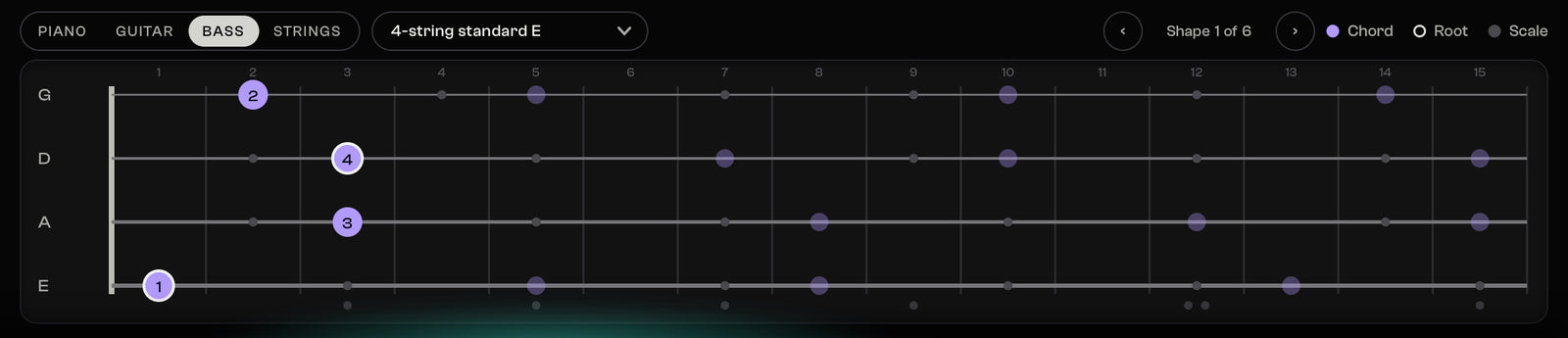
Every chord on piano, guitar, bass or strings. Playable guitar and bass shapes with the fingers and the barre, in 21 tunings for 6, 7 and 8 strings and 4, 5 and 6 string bass. Voicings for a string orchestra, a string quartet, a choir or a brass section, every part in its comfortable range and moving smoothly from chord to chord.

The song
Intro, verse, chorus, bridge and outro sit on a timeline, each as wide as it plays. Give a section its own key, repeat it or drag it to a new place. Drag a chord's edge to make it longer or shorter and the chords after it move along. Drop chords in from the palette or the Library and see exactly where they land.

Four lanes
Each lane has its own pattern, register and sound: strums, walking bass, arpeggios and a melody sketch to build on. Load your own instrument and effect plugins on every lane, or choose one main Sound that plays everything you try out. A section can play its lanes its own way, and swing and feel make the parts sound played. If a plugin crashes, only its sound goes quiet.

Into your DAW
Play and stop with the space bar, loop the whole song or only the chords you select, set the tempo, a click and a count-in. In your DAW, MODALITH follows its play, position and tempo. Drag the whole song into your DAW as MIDI with a track for each lane, or one lane at a time; every lane also plays out on its own MIDI channel.
Chords from audio
Load a recording, or let MODALITH listen to a track in your DAW or to your audio input. It finds the key, the tempo and the chords and turns them into a progression you can edit, play and drag out.

Music theory, done for you
Not just chord names: MODALITH shows what each chord does in the key, so you learn while you write.
Delivery and compatibility
Built on open music data
MODALITH learned how chords move from openly licensed collections: the McGill Billboard chord annotations (CC0), the Rock Corpus by Trevor de Clercq and David Temperley (CC BY 4.0), the Weimar Jazz Database of the Jazzomat Research Project (ODbL) and our own analysis of public-domain scores from OpenScore Lieder (CC0) and PDMX (CC BY 4.0). The Songs collection shows the chord changes these collections give for famous songs, named by title and artist so you can find them. The names only identify the songs: no artist is involved with or endorses MODALITH.
Full credits are in the plugin’s About screen and in the User Guide.
Questions
No. Click chords that fit, follow the Guide or start from a ready progression without knowing any theory. If you want to learn, MODALITH shows what each chord does in the key, so the theory comes to you while you write.
More than 2,000 progressions in 21 styles, from pop, rock, jazz and classical to gospel, film, EDM, trap, lo-fi, K-pop and metal, plus the real chords of 1,045 famous songs: chart hits, rock classics and jazz standards. You see every chord on piano, guitar (6, 7 and 8 strings in 21 tunings), bass or a string section, choir or brass.
Yes. Load a WAV, AIFF, FLAC, MP3 or Ogg file, or let MODALITH listen to a track or your audio input. It finds the key, the tempo and the chords as a progression you can edit. Chords it is not sure of are marked, with its second choice one click away.
Drag the whole song onto your tracks (one track per lane) or a single lane, or export a MIDI file. In DAWs that route a plugin's MIDI to other tracks, each lane also plays out on its own MIDI channel. With Sync to host on, MODALITH follows your DAW's play, position and tempo.
Yes. Load MODALITH as an instrument to hear the lanes through the instruments you load inside it, or put MODALITH MIDI FX in a track's MIDI FX slot to drive that track's instrument. To get the parts onto their own tracks, drag them out as MIDI.
Yes. Load your own instrument and effect plugins on every lane, and choose one main Sound that plays everything you try out. Each plugin runs on its own: if one crashes, only its sound goes quiet and Restart brings it back.
The 2,000+ progressions and everything Generate writes are not: they are learned from openly licensed collections of chord changes and from public-domain music, and none repeats five or more chords in a row from any song in those collections. Songs is different on purpose: it shows the real chord changes of 1,045 famous songs as those collections give them, named by title and artist so you can find them, to learn from and build on.
Buy MODALITH once for a permanent licence, or use it during an active All-Access or Plugin Pass subscription. It is VST3, AU and a standalone app, not AAX, so it does not load in Pro Tools; with Pro Tools, write in the standalone app and bring the song over as a MIDI file. The new All-Access subscription provides access to all included products, downloads and updates only during the paid period. When the plan ends, subscription files are removed from your download orders and the included plugins and apps stop working. Separately purchased products and perpetual licences already earned through the previous All-Access Pass are preserved.
Yes. In Settings, choose MIDI out: "Chords + scale & root". Next to the chords, MODALITH then sends the root of the chord that is playing on MIDI channel 15 and the notes of the current scale on channel 16, so an LED fretboard, a lighting app or any visualizer that listens to MIDI can show the scale and the chord while you play. The channels can be changed, and the user guide lists the exact notes.
MODALITH
Free app for Mac and Windows
Install and update every plugin with the free Plugins & Apps Manager app for Mac and Windows.
Enable each plugin online once. Permanent licenses then work offline; Pass licenses require periodic online renewal. How it works
Plugins and apps supplied by the new All-Access subscription work only during your paid period. Separately purchased products and perpetual licences already earned through the previous pass are preserved.
Your installations, presets and projects are not deleted. Renew your Pass or buy the plugin separately and enable it online to use it again.
Every step in the real Manager: sign in, install, enable, Update all and working offline.
Watch the Manager tour (5 min)Develop Device All-Access Pass
Plugins, apps and sounds in one monthly or yearly subscription. All included downloads and updates are available during your paid period.