HumBeat 3
Version 3.0.5
Download for MacmacOS · Universal · 55.8 MB
Download for WindowsWindows · x64 · 12.8 MB
Your cart is empty
Continue shoppingBestsellers this week
Drum humanizer · VST3 · AU · Standalone
 Drum Humanizer Plugin
Programmed drums, played like a drummer: the timing, the dynamics and the two hands and two feet of a real player. Your drum plugin now plays inside HumBeat, so there is nothing to route — press play and hear it.
One-time purchase · Instant download · Included in the All-Access Pass
Intro & upgrade offers end 31 October 2026, 23:59 CET.
Intro and upgrade offers ended on 31 October 2026.
Download without signing in or checking out. Enable it after installing.
Download any installer for Mac or Windows. No account, order or payment is needed to download.
Version 3.0.5
After installing, sign in to the Plugins & Apps Manager to enable a purchased license or start a free 7-day trial. Downloading and installing do not start the trial.
The product works once it is enabled with a valid license. The 7-day trial begins the first time you enable it and ends at the same time on both computers.
Already installed the Manager? Open it, sign in, select your product and choose Enable.
Browse all plugin installersOr get every plugin and app with Plugin Pass from 314,00 Kč a month.
Own HumBeat 1 or HumBeat 2? Log in with the account you bought it with and 30 % comes off at checkout, automatically.

Tutorial
A tour of the real plugin with a drum plugin playing inside it: drum maps, timing and groove, dynamics and ghost notes, hands and feet, MIDI files, Drag and Export, and Capture.
Your drums inside
HumBeat 3 is an instrument: put it on your drum track and load Superior Drummer, EZdrummer, Addictive Drums, GetGood Drums, Steven Slate Drums, BFD or Kontakt inside it. Your MIDI clips play humanized, in every DAW, with no second track and no MIDI routing. Your project remembers the drum plugin with all its settings.

HumBeat 3 and HumBeat 2
Everything HumBeat 2 did, done again from scratch — and the things customers asked for most.
| HumBeat 2 | HumBeat 3 | |
|---|---|---|
| Your drums | A second track, with MIDI routed to your drum plugin | Your drum plugin plays inside HumBeat. Nothing to route, in every DAW |
| Ahead of the beat | Notes could only come late | Push, rush and play ahead, like a real drummer |
| The same take again | Every playback a little different | Take numbers: playback, bounce and export are the same performance, note for note |
| Drum maps | General MIDI | 11 layouts — Superior Drummer 3, EZdrummer 3, Addictive Drums 2, GetGood Drums, BFD3, SSD5, MODO DRUM… MIDI written for one plays on another |
| Ghost notes | Kept quiet | Adds snare ghost notes where a drummer plays them, and shapes the ones you programmed |
| Hands and feet | Hand bias, alternating kicks | Real sticking: lead hand on the cymbals, the other on the backbeat, fast runs alternate; each foot its own feel |
| Groove | Pocket and feel | Six groove styles: Straight, Laid back, Push, Shuffle, Half-time, Funk |
| Tempo in MIDI files | One tempo | The whole tempo map and every time signature |
| Keeping a performance | Drag from the roll | Capture of the whole song at its real positions: drop it at bar 1 |
| Hearing a MIDI file | Through your DAW | Play and Loop with your drums, right in HumBeat |
| Presets | 5 | 12, and your HumBeat 2 presets come along |
| Mac | Intel and Apple Silicon, macOS 10.15+ | Intel and Apple Silicon, macOS 11+ |
HumBeat 2 stays installed next to HumBeat 3, so your older projects keep opening as they are.

See the drummer
The live roll shows every hit on its kit row: the programmed note, the played note in the colour of the hand or foot that played it, and the velocity. Next to it, the timing of each instrument, who played what and the sticking of the hands and feet. Point at a note to see exactly what happened to it.

MIDI files
Drop a drum MIDI file onto HumBeat and see the whole file humanized; every knob you turn shows at once. Press Play to hear it with your drums, then drag the humanized MIDI into your song or export it, with its tempo map intact.
Drum maps
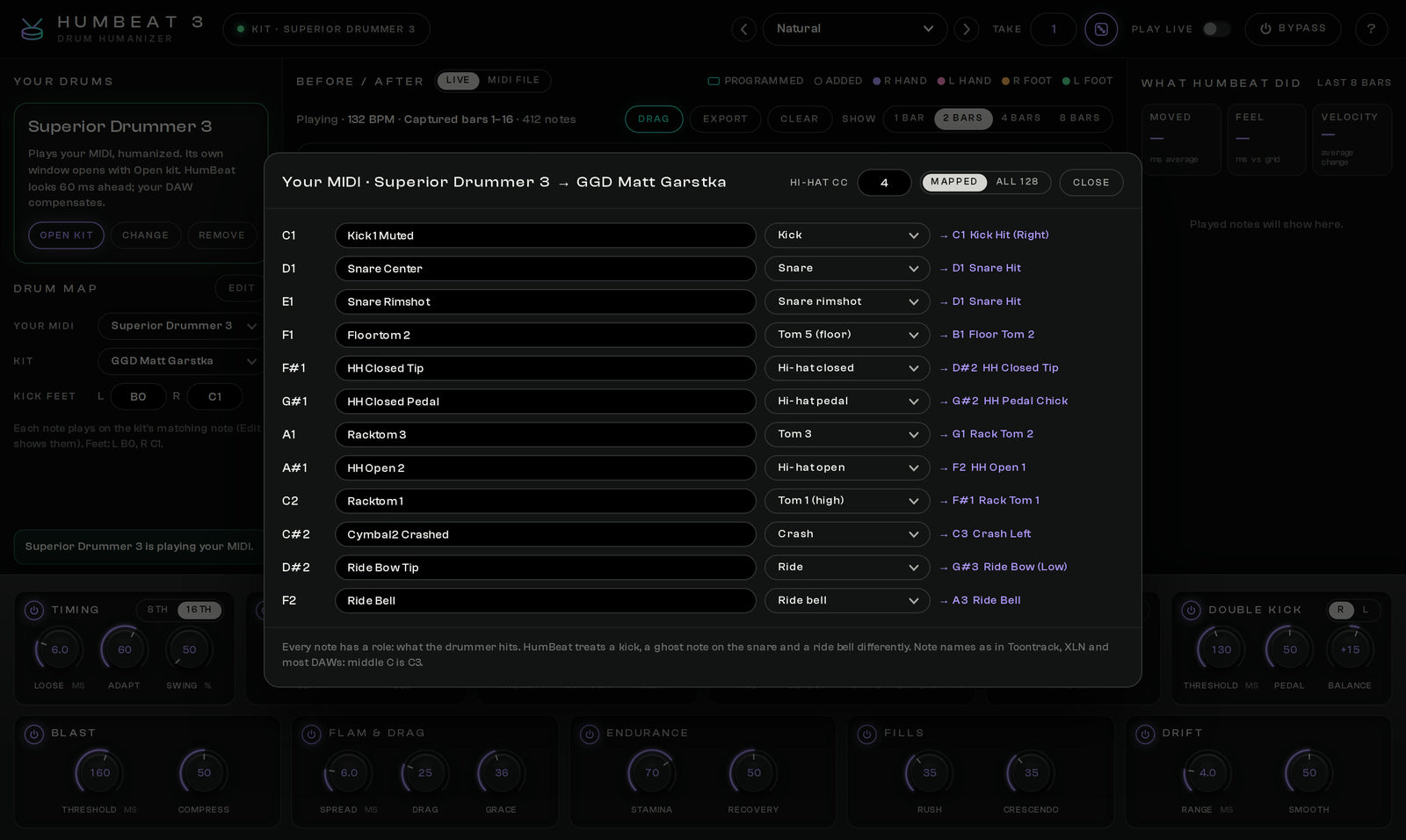
Tell HumBeat which plugin your MIDI was written for and it knows every kick, ghost note and ride bell. Load a different drum plugin and each note plays on its matching note there: a Superior Drummer groove on GetGood Drums, a General MIDI file on Addictive Drums.
Drum plugins
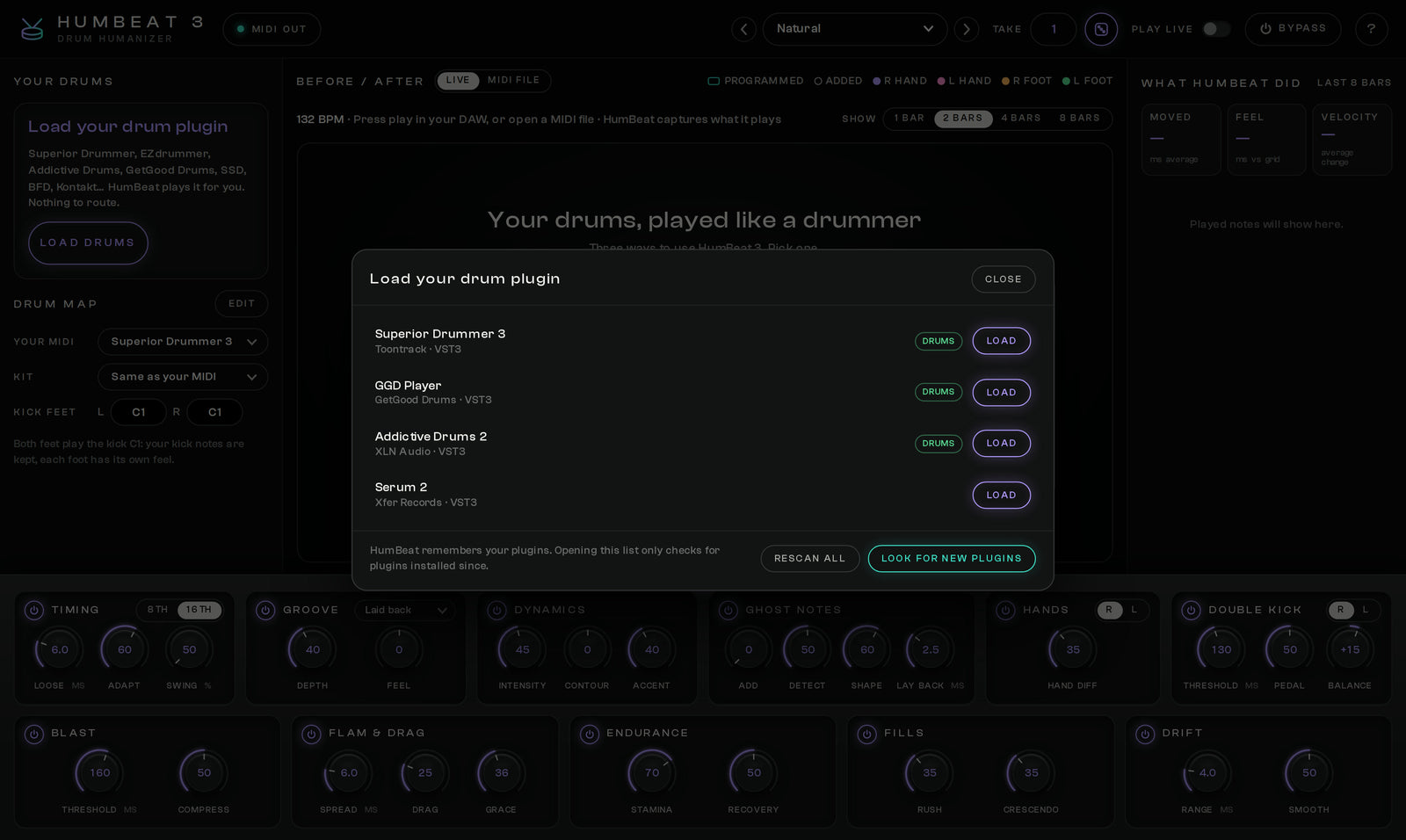
HumBeat looks for your plugins once and remembers them; later only new ones are checked. Drum plugins come first in the list. A plugin that hangs is checked in a separate helper and you decide whether to skip it or wait, so your DAW stays safe.
Eleven modules
Delivery and compatibility
Questions
HumBeat 3 is a drum humanizer: it turns programmed drum MIDI into a performance with the timing, dynamics and the two hands and two feet of a real drummer. Your drum plugin plays inside HumBeat 3, so there is nothing to route.
No. Put HumBeat 3 on your drum track as the instrument and load your drum plugin inside it. Your MIDI clips play humanized in every DAW. If you prefer your own routing, HumBeat 3 can still send humanized MIDI to another track.
Any VST3 or Audio Unit drum instrument: Superior Drummer, EZdrummer, Addictive Drums, GetGood Drums, Steven Slate Drums, BFD, Kontakt and more. Drum maps for the popular ones are built in, and MIDI written for one plugin plays on the matching notes of another.
Yes. Log in with the account you bought it with and 30 % comes off HumBeat 3 at checkout automatically. There is no code to enter. This upgrade offer ends on 31 October 2026 at 23:59 CET. It will not continue into November or return in December.
Yes. HumBeat 3 is a separate plugin, so HumBeat 2 stays installed and your older projects keep opening as they are. Your HumBeat 2 presets can be imported into HumBeat 3.
VST3 and the standalone app on Windows 10 and 11 (64-bit), and VST3, Audio Unit and the standalone app on macOS 11 or newer, on Intel or Apple Silicon. Pro Tools (AAX) is not supported. The download includes installers for Windows and macOS and the User Guide.
HumBeat 3
Plugins & Apps Manager
Install and update every plugin with the free Plugins & Apps Manager app for Mac and Windows.
Watch the Manager tour (5 min)
Enable each plugin online once. Permanent licenses then work offline; Pass licenses require periodic online renewal. How it works
Plugins and apps supplied by the new All-Access subscription work only during your paid period. Separately purchased products and perpetual licences already earned through the previous pass are preserved.
Your installations, presets and projects are not deleted. Renew your Pass or buy the plugin separately and enable it online to use it again.
Develop Device All-Access Pass
Plugins, apps and sounds in one monthly or yearly subscription. All included downloads and updates are available during your paid period.