


Guitar Pro & MIDI · Standalone app · Windows & macOS
SHREDSYNC 3Guitar Pro & MIDI Guitar Humanizer
Drop in a Guitar Pro tab or a MIDI part. ShredSync 3 writes it for your guitar library — palm mutes, harmonics, slides and all — and plays it with real hands: every stroke a little ahead or behind, every chord strummed, every pick a little harder or softer. Your own library plays it right in the app, so you hear the real sound before you drag the MIDI into your DAW.
NewStringSync is now part of ShredSync 3. Your tabs and your MIDI, in one app. See what’s new
- Windows 10 / 1164-bit · ASIO supported
- macOS 11 or newerApple Silicon (M1 or later)
- Any DAWDrag or save the MIDI
Own ShredSync, StringSync or the bundle? Log in with the account you bought it with and your upgrade price comes off at checkout, automatically.

StringSync is now part of ShredSync 3
Two apps and two steps, now one flow
StringSync wrote your tab for your guitar library. ShredSync made it sound played. ShredSync 3 does both in one go, and lets your own library play the result before it goes into your DAW.
Before2 apps, 2 steps
Now1 app, 1 flow
ShredSync 3one app
NewYour own guitar library plays it right in the app, so you hear the real sound before the MIDI leaves.
UpgradeOwn StringSync, ShredSync or the bundle? You get ShredSync 3 at an upgrade price, taken off at checkout on the account you bought it with.
New in ShredSync 3
Rebuilt from the first note
ShredSync 3 is a new app, made from what guitarists asked for: your tabs and your MIDI in one place, your own library playing it, and a performance you can actually hear change.
Guitar Pro · MIDI
One app for your tabs and your MIDI
Both end as a humanized MIDI part for your guitar library, ready to drag into your DAW. The difference is how much the file tells ShredSync: a Guitar Pro file says how every note is played, a MIDI file says which note and when.
The same for both: HumanizingDouble and QuadYour library’s mapDrag MIDI
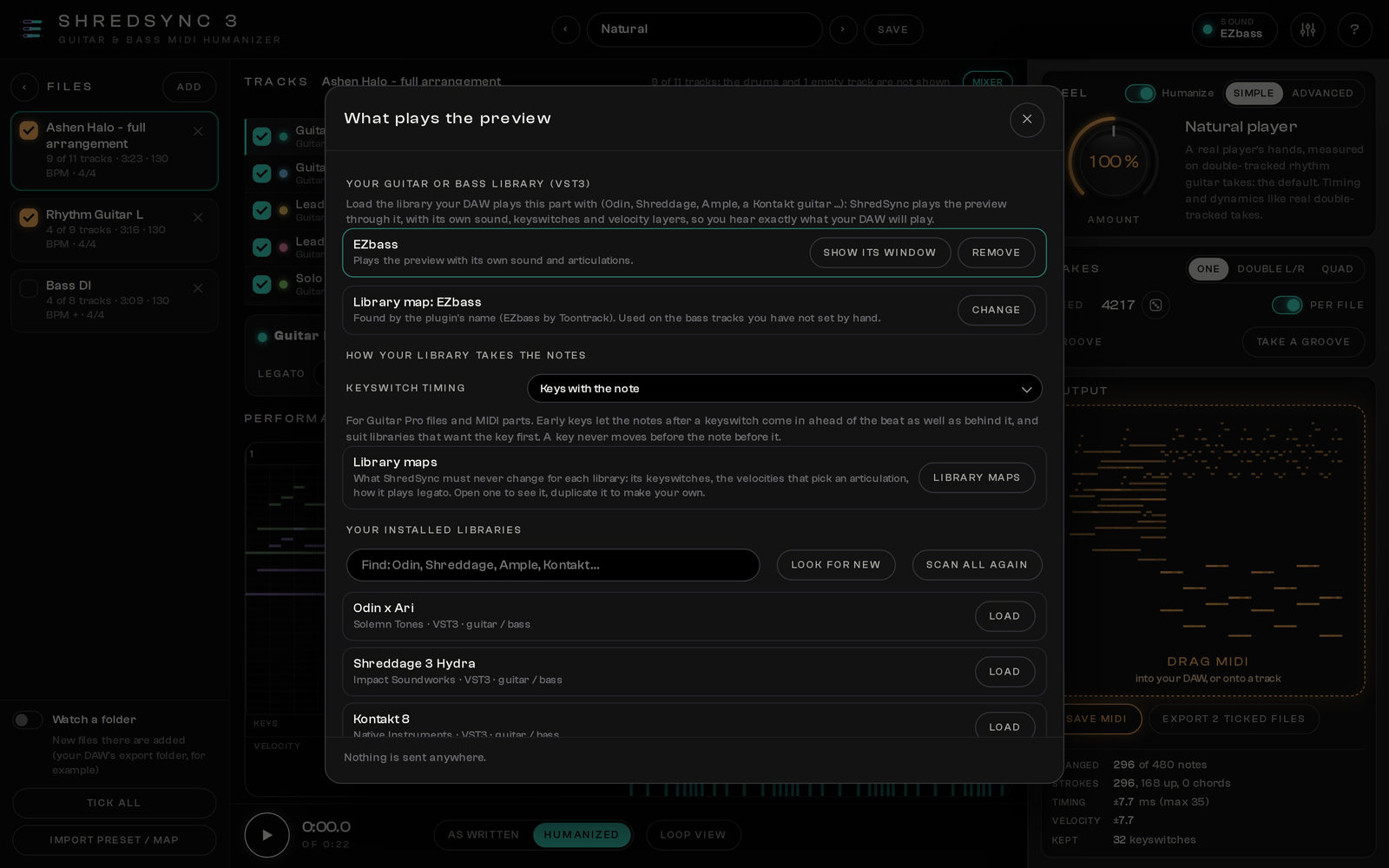
Your sound
Your own guitar library plays the preview
Load the guitar or bass library you already play in your DAW, right inside ShredSync 3. The preview plays with its own sound, keyswitches and velocity layers, so what you hear is what your DAW will play. No samples to download, no second sound to get used to. No library at hand? A simple built-in guitar voice plays, enough to judge the timing.
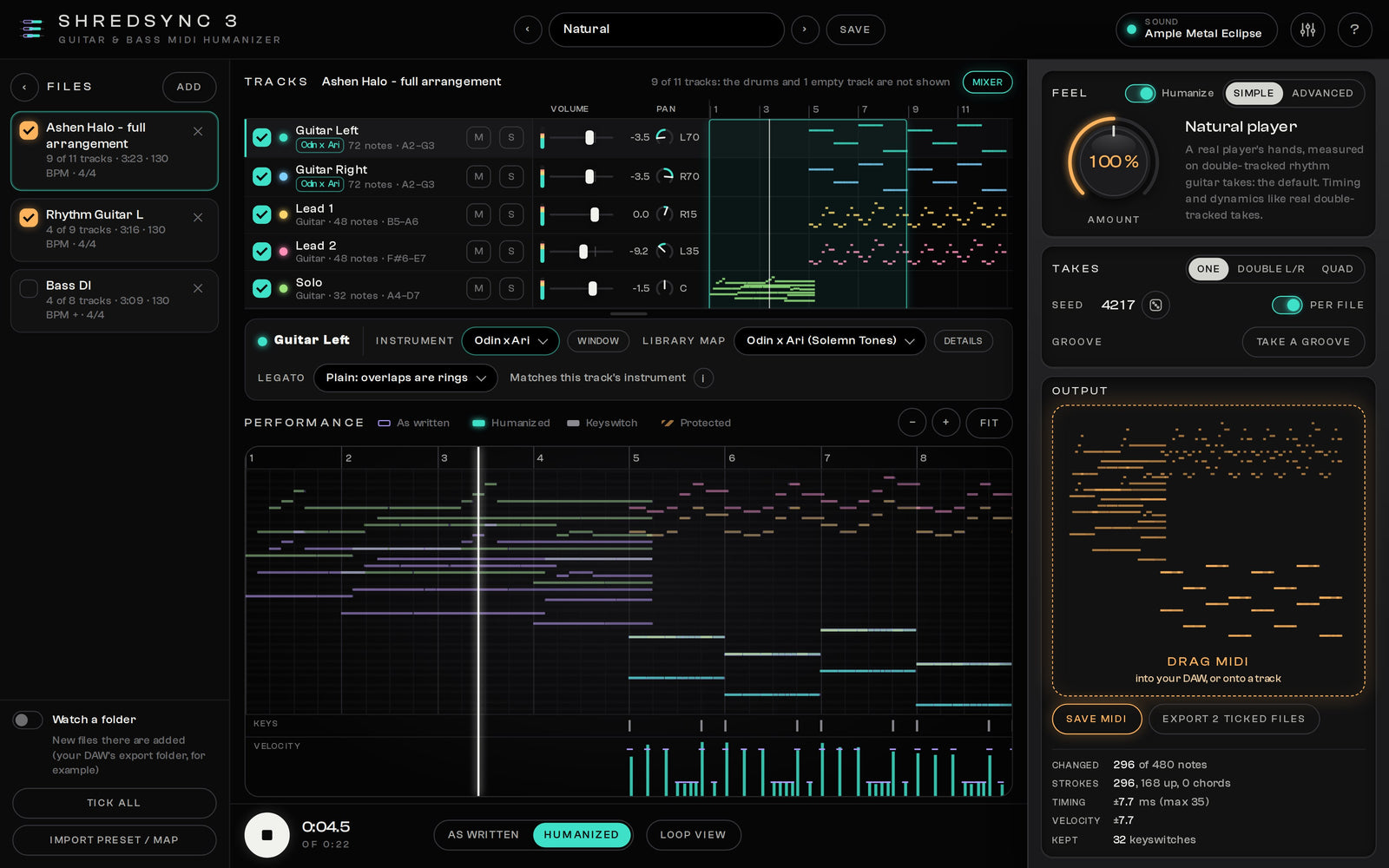
Instrument per track
Every track with the right library, and a mixer
The library in Sound plays every track; any track can load one of its own. Rhythm guitars on one library, the lead on another, the bass on a bass library: up to eight at once. Turn on the mixer for a fader and a pan on every track, to hear the parts the way they will sit in your mix. The mixer only changes what you hear: your MIDI stays exactly as it is.
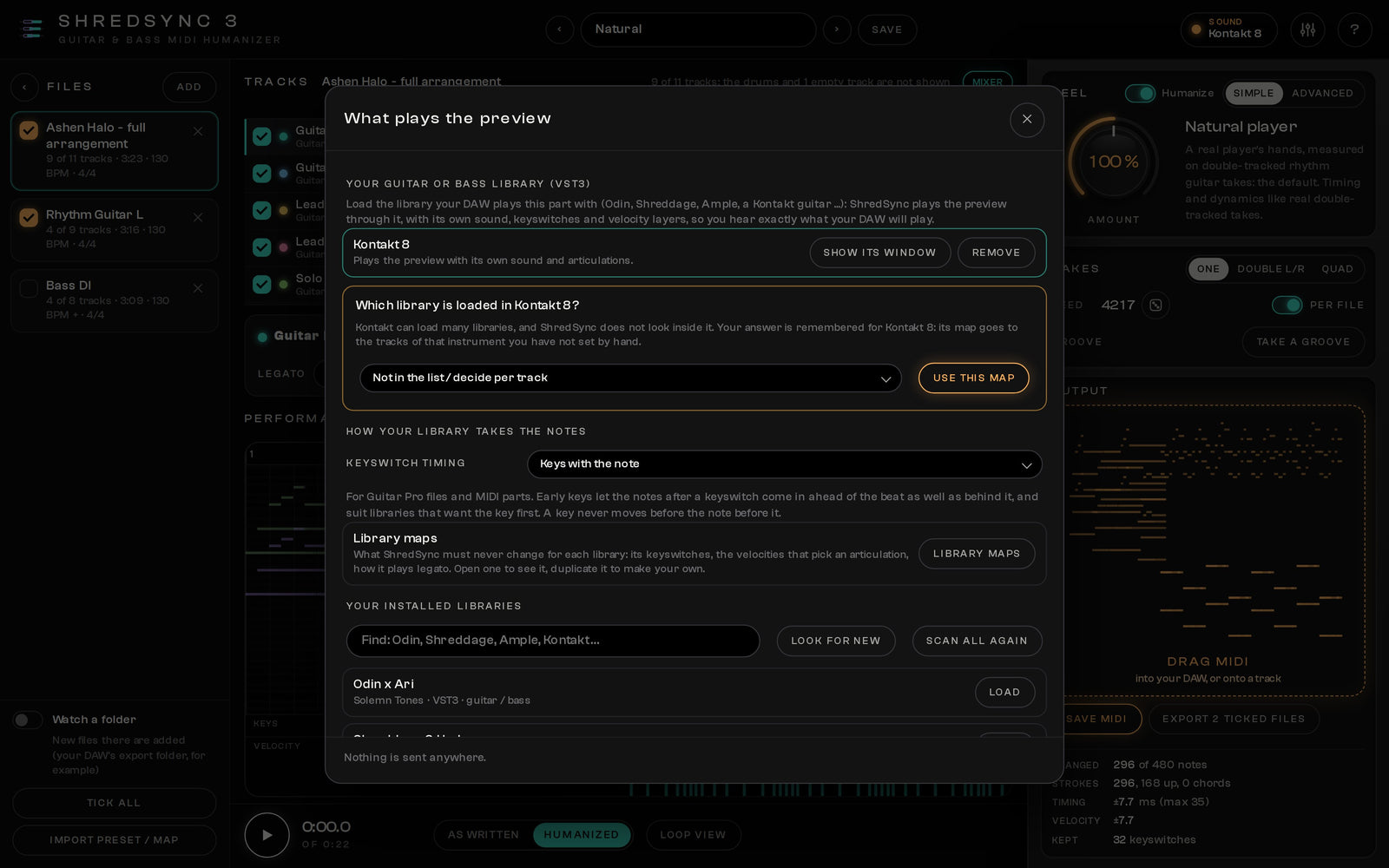
Library maps
The right keyswitches, picked by itself
Every library speaks its own language: which key plays a palm mute, which velocity is a pinch. Load a mapped library and ShredSync 3 finds its map for you, EZbass on the bass tracks, Odin on the guitars. Libraries that run inside Kontakt? It asks once which one is loaded and remembers your answer. Your own picks always win.

Double and Quad
Two or four takes that sound like one player
Double writes a left and a right take of the same part; Quad writes four. They share part of their feel, the way the same guitarist tracks a part again: tight together where you play tight, never the same twice. Hard-pan them and you get real double-tracked rhythm guitars from one part. The same number gives the same takes every time.
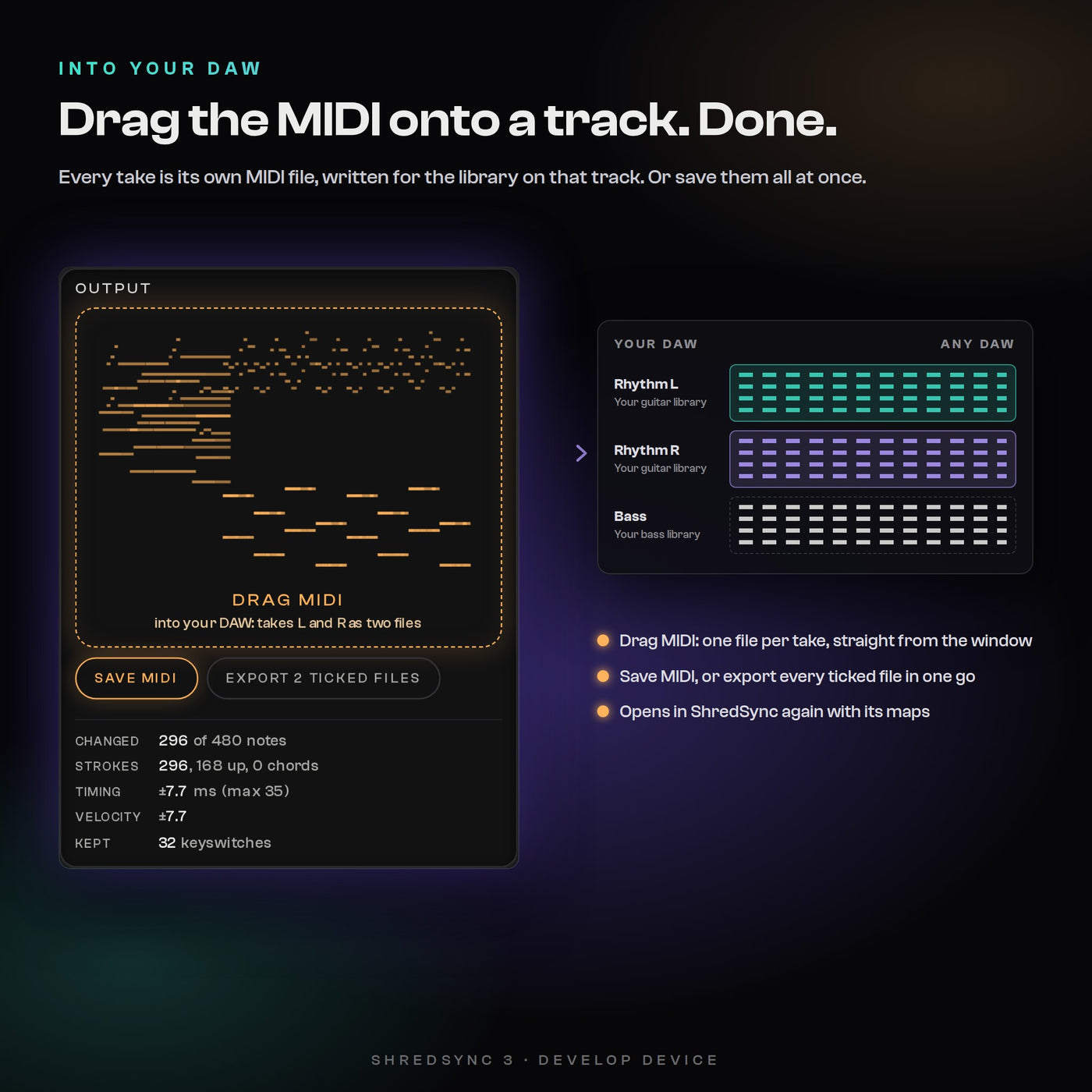
Into your DAW
One file per take, straight onto your track
Grab the result and drop it on a track in any DAW: one MIDI file per take, written for the library on that track. Or save it, or tick several files and export them all at once. Want to humanize a part from your song? Drag the clip out of your DAW into ShredSync 3, and drag the result back.
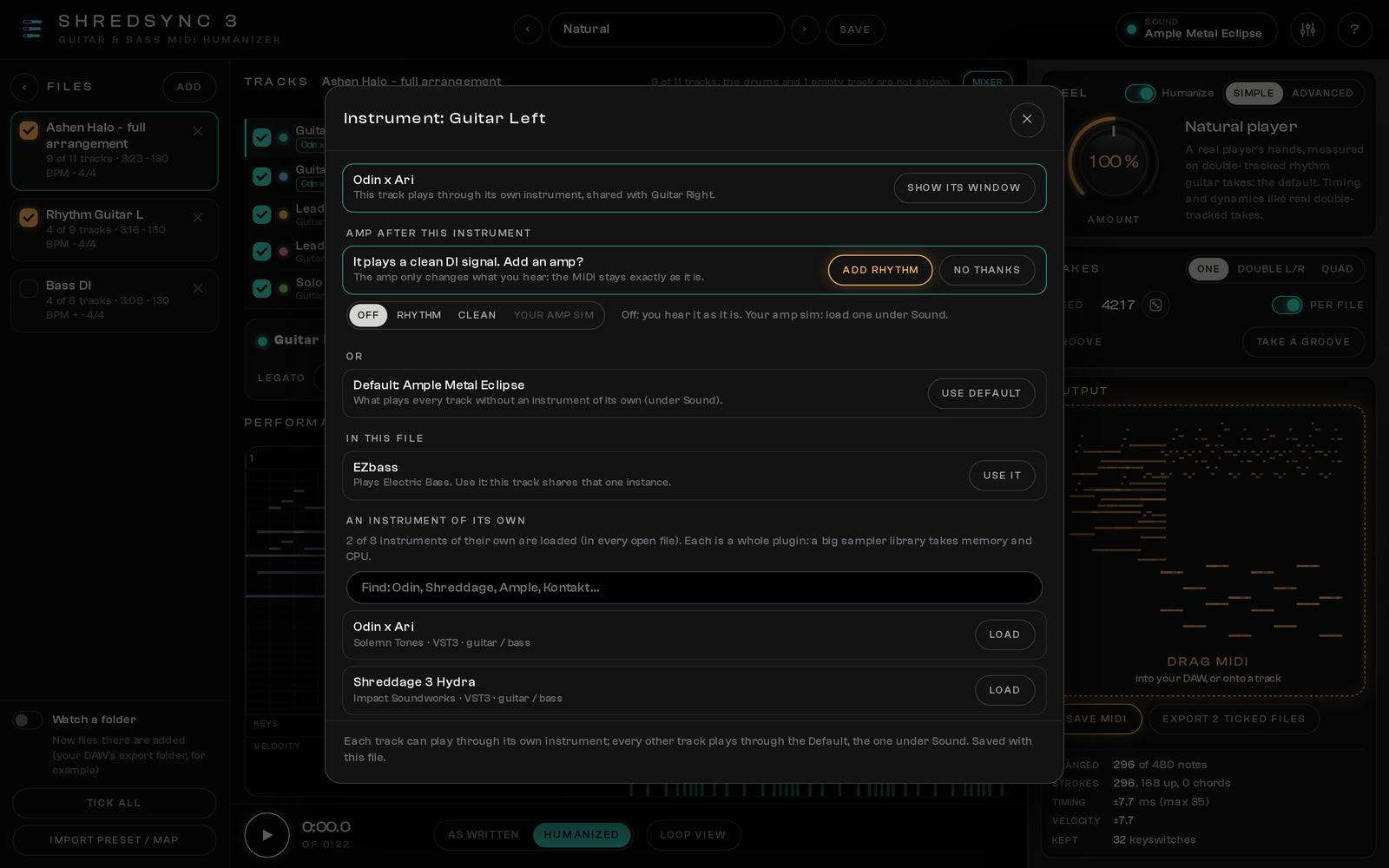
Quick Amp
A real amp tone for clean libraries
Many guitar libraries play a clean DI signal, the way you would record it. ShredSync 3 hears that and offers an amp: Quick Amp Rhythm for chugs and power chords, Clean for everything else, one click. Or load your own amp sim. Only the preview changes: the MIDI stays exactly the same.
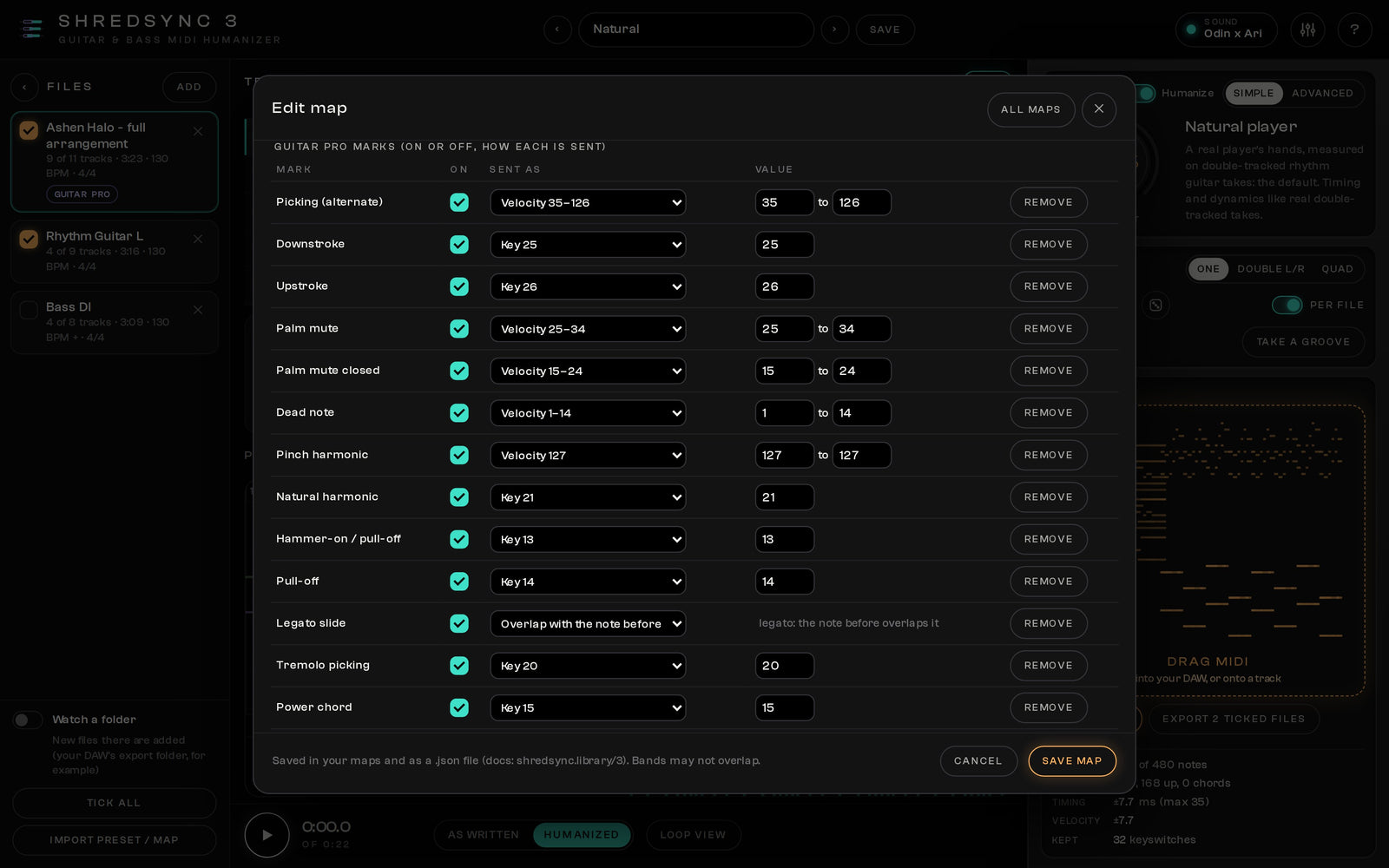
Guitar Pro techniques
Your tab, played the way it is written
Palm mutes, pinch and natural harmonics, hammer-ons and pull-offs, slides, bends, dead notes and let ring: ShredSync 3 reads them from the tab and sends each one the way your library expects it. Turn any technique off, change how it is sent, or switch humanizing off for the exact conversion.
How it works
From a tab to a real performance in four steps
- 1Open a partDrop a Guitar Pro file or a MIDI file on the window. Several at once are fine.
- 2Load your libraryPick the guitar or bass library you use in your DAW. Its map comes with it.
- 3Choose a feelNatural plays like a real player. Tighter, looser, Double or Quad: one click, and you hear it change.
- 4Drag it into your DAWDrop the MIDI on a track, one file per take. Done.
Your feel
As tight or as loose as the song wants
Natural is a real player’s hands, measured on double-tracked rhythm guitar takes. Every other preset is one click away, and every control can be turned to taste.
Supported libraries
17 guitar and bass libraries, mapped out of the box
These libraries are products of their makers that you own and play in your DAW; ShredSync 3 does not include them. Any other guitar or bass instrument plays with the Generic guitar or bass map, or with a map you make yourself.
- The Odin III
- Odin x Ari
- The Behemoth
- Shreddage 3.5 Argent
- Shreddage 3.5 Hydra
- Shreddage 3.5 Jupiter
- AXURE II
- Ample Metal Eclipse
- Ample Metal Hellrazer
- Ample Metal R
- Ample Guitar L
- Ample Bass P / J
- RealEight
- Djinn Bass 2
- Grove Bass
- Umansky Bass
- EZbass
Delivery and compatibility
An app next to your DAW
- Windows
- Windows 10 / 11, 64-bit · standalone app, ASIO audio interfaces supported
- macOS
- macOS 11 or newer on Apple Silicon (M1 or later) · standalone app
- Not supported
- Intel Macs
- Opens
- Guitar Pro files (Guitar Pro 3 to 8) and MIDI files
- Gives you
- MIDI for any DAW: drag it onto a track, save it, or export many files at once
- Your libraries
- The guitar and bass libraries you already own: VST3 instruments, and Audio Units on a Mac, Kontakt libraries included
- Built in
- Quick Amp (Rhythm and Clean) for libraries that play a clean DI, and a simple guitar voice when no library is loaded
- In the download
- Windows installer, macOS installer, User Guide (PDF)
- Licence
- One-time purchase, instant download; included in the All-Access Pass
Questions
Frequently asked
What is ShredSync 3?
ShredSync 3 turns a Guitar Pro tab or a MIDI file into a real guitar or bass performance. It moves every stroke a little off the grid the way hands do, strums chords in the picking direction, lets the timing push and pull over a phrase and lets the picking strength breathe, while palm mutes, pinches and your library's keyswitches stay exactly as written. Your own guitar library plays the result inside the app, and you drag the MIDI straight onto a track in your DAW.
Guitar Pro or MIDI: which should I use?
Both work. A Guitar Pro file says how every note is played, so ShredSync 3 writes palm mutes, harmonics, slides, hammer-ons, bends, dead notes and dynamics for your library and then humanizes them. A MIDI file says which note and when: ShredSync 3 humanizes it and keeps your own keyswitches and velocities. Have both? Use the Guitar Pro file.
Is there a plugin version?
No. ShredSync 3 is an app next to your DAW, on purpose: a player's timing depends on the notes that come next, so it works on the whole part. Drop a file in, humanize it, then drag the MIDI onto a track or save it. To humanize a part from your song, drag the clip out of your DAW into ShredSync 3 and drag the result back.
Which guitar libraries does it work with?
Popular guitar and bass libraries are mapped out of the box: The Odin III, Odin x Ari and The Behemoth, Shreddage 3.5 Argent, Hydra and Jupiter, AXURE II, Ample Metal Eclipse, Hellrazer and R, Ample Guitar L, Ample Bass P / J, RealEight, Djinn Bass 2, Grove Bass, Umansky Bass and EZbass. Load your library and ShredSync 3 picks its map by itself; for Kontakt and other samplers it asks once which library runs in them and remembers it. Any other instrument plays with the generic guitar or bass map, or with a map you make yourself.
Do I need my own guitar library?
To hear the real sound, yes: ShredSync 3 loads the guitar or bass library you already use in your DAW and plays the preview with it, with its own keyswitches and sounds. Without one, a built-in guitar voice plays, which is enough to judge the timing. The MIDI you save is played later by whatever instrument you use in your DAW.
Can each track have its own instrument?
Yes. The library you choose in Sound plays every track, and any track can load its own instrument, so rhythm guitars, lead and bass each play with the right library. A simple mixer sets the volume and pan of each track for listening. If your library plays a clean DI sound, the built-in Quick Amp gives it a Rhythm or Clean amp tone, or you load your own amp sim.
What if my guitar library crashes?
ShredSync 3 keeps going. Every library runs on its own, so if one crashes or freezes, only that track goes quiet, the rest keeps playing, your settings stay, and it restarts with one click.
Can I get double-tracked rhythm guitars?
Yes. Double L/R writes two performances of the same part and Quad writes four: they share part of their feel like one player recording the part again, so hard-panned rhythm guitars sound like real double takes. Drag MIDI drags all of them.
I own ShredSync, StringSync or the bundle. What do I pay?
Log in with the account you bought it with and your upgrade price comes off at checkout automatically, no code needed. Own the ShredSync + StringSync bundle, or both apps: ShredSync 3 is free. Own one of the two: you pay only the difference between its price and ShredSync 3.
I used StringSync. What now?
StringSync is now part of ShredSync 3. It opens Guitar Pro 3 to 8 files, writes them for your library with every technique under your control and humanizes the result, or gives you the exact conversion with humanizing switched off.
What are the system requirements?
Windows 10 or 11 (64-bit), with ASIO audio interfaces supported, or macOS 11 Big Sur or newer on Apple Silicon (M1 or later). Intel Macs are not supported. The download includes the installers for Windows and macOS and the User Guide (PDF). It works with any DAW that takes MIDI files.
ShredSync 3
Your tab in. A real guitarist out.
Develop Device All-Access Pass
Why buy one plugin at a time?
One annual pass unlocks the entire Develop Device catalogue, plugins, presets, DAW templates, drum MIDI, cabinet IRs and amp profiles, including this product, plus everything new I release this year. A fraction of buying it piece by piece.
- Every Develop Device plugin & app, including this one
- Serum 2 & Vital synth preset toolkits
- Superior Drummer 3, EZdrummer, GGD, MODO & Addictive Drums presets
- DAW templates for Cubase, Studio One & Reaper, plus 30K+ drum MIDI
- Cabinet IRs, NAM profiles & presets for Fractal, Kemper & Ampero
- Quad Cortex captures, shared straight to your Cortex Cloud
- Every new Develop Device release during your active year
- What you unlock stays downloadable, even after your year ends