


Hybrid EQ · VST3 and AU · Windows & macOS
OBSIDIAN 2Hybrid EQ
Eight bands that sound exactly like the curve you draw, in every phase mode, right up to 20 kHz. Make any band dynamic, put it on the mid, the sides, left or right, tame ringing resonances and add a console’s colour. Rebuilt from scratch for mixing and mastering.
- Windows 10 / 1164-bit · VST3
- macOS 11 or newerApple Silicon (M1 or later) · VST3 and AU
- Any DAWthat loads VST3 or AU plugins
Own OBSIDIAN 1? Log in with the account you bought it with and 30 % comes off at checkout automatically.

Measured, in every mode
The curve you see is the sound you hear
An EQ curve is only worth something if the audio follows it. We measured every mode against the analog curve, on the plugin itself, the same way you would in an analyser.
| Phase mode | OBSIDIAN 1 | OBSIDIAN 2 |
|---|---|---|
| Zero Latency | +6.00 dB | +6.00 dB |
| Natural | +2.97 dB | +6.00 dB |
| Linear | +2.98 dB | +6.00 dB |
Right up to 20 kHz, with zero latency. Near the top of the spectrum a zero-latency EQ normally bends high bands out of shape. OBSIDIAN 2 corrects it without adding delay: over 475 test bands (every shape, 1 to 19 kHz, Q 0.3 to 8, ±18 dB) it stays within 0.09 dB of the analog curve at 44.1 kHz and within 0.06 dB at 48 kHz.
Natural adds the phase of an analog EQ for 0.7 ms of delay. Linear changes no phase at all, in four resolutions from 53 to 352 ms at 48 kHz. All three play the same curve.
New in OBSIDIAN 2
Rebuilt from scratch, around the curve
A new engine, a new design and a faster way to work. Your OBSIDIAN 1 projects open in it.
Upgrading from OBSIDIAN 1
Bought OBSIDIAN 1? You pay 30 % less for OBSIDIAN 2. No code, no forms.
- 1Log inWith the account you bought OBSIDIAN 1 with. The 30 % comes off at checkout by itself.
- 2Install over version 1OBSIDIAN 2 takes the place of OBSIDIAN 1 under the same name, so your DAW finds it.
- 3Open your projectsYour songs open with their settings and sound the way you left them. Your OBSIDIAN 1 downloads stay in your account.
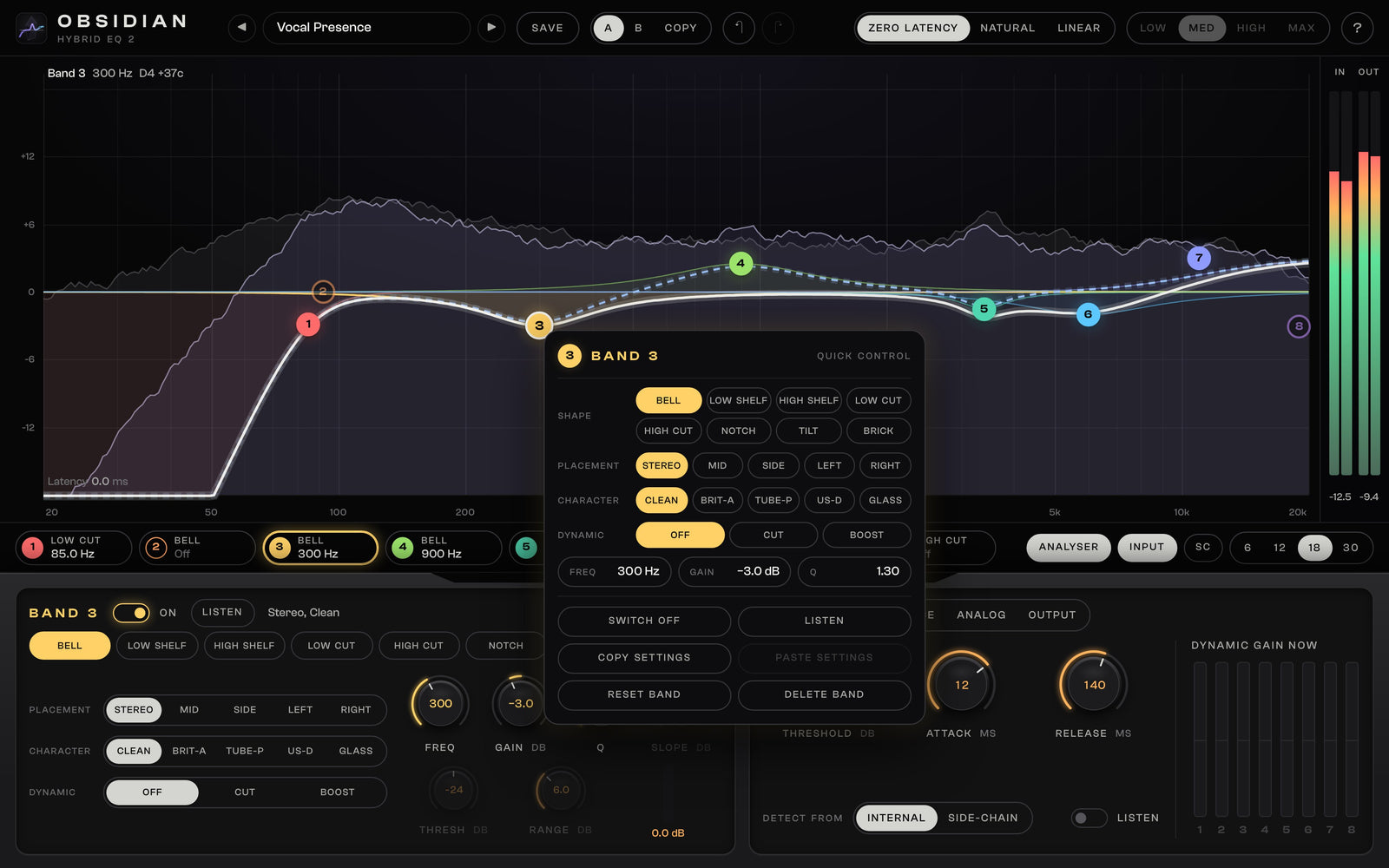
Quick control
Right-click a band. Everything is there.
Drag a band to move it, use the wheel for its Q, double-click to switch it on or off. Right-click it for its quick menu: shape, slope, placement, character and dynamics, exact values you type in, copy and paste to another band. Right-click the empty curve to add a band right there. Every change is one step of undo.
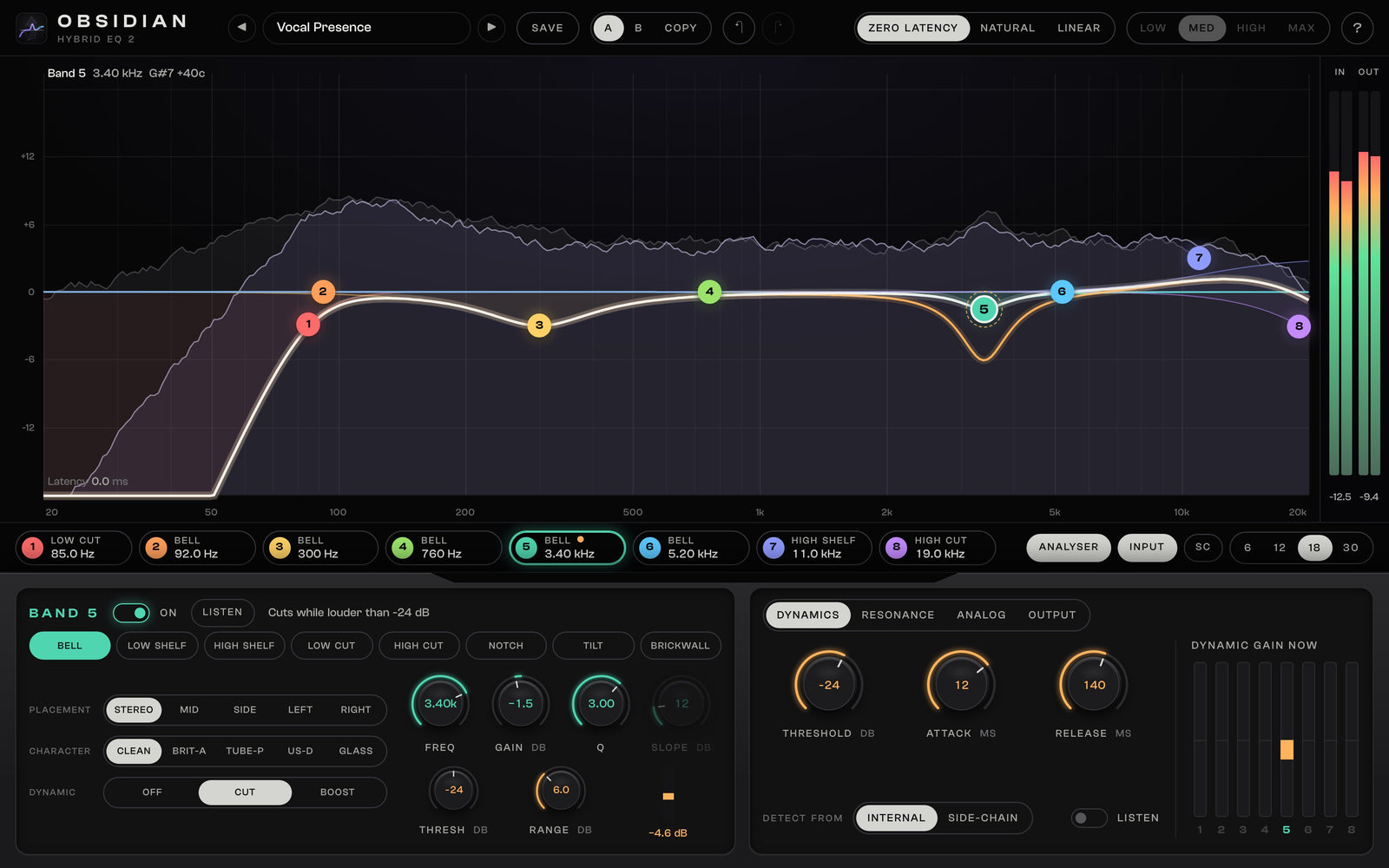
Dynamic bands
It moves only when the sound does
Any bell or shelf turns dynamic: it cuts, or boosts, only while its part of the sound is louder than the threshold. One threshold for all bands plus an offset per band, attack and release, a side-chain input to duck one track under another, and a meter that shows how far each band moves right now.
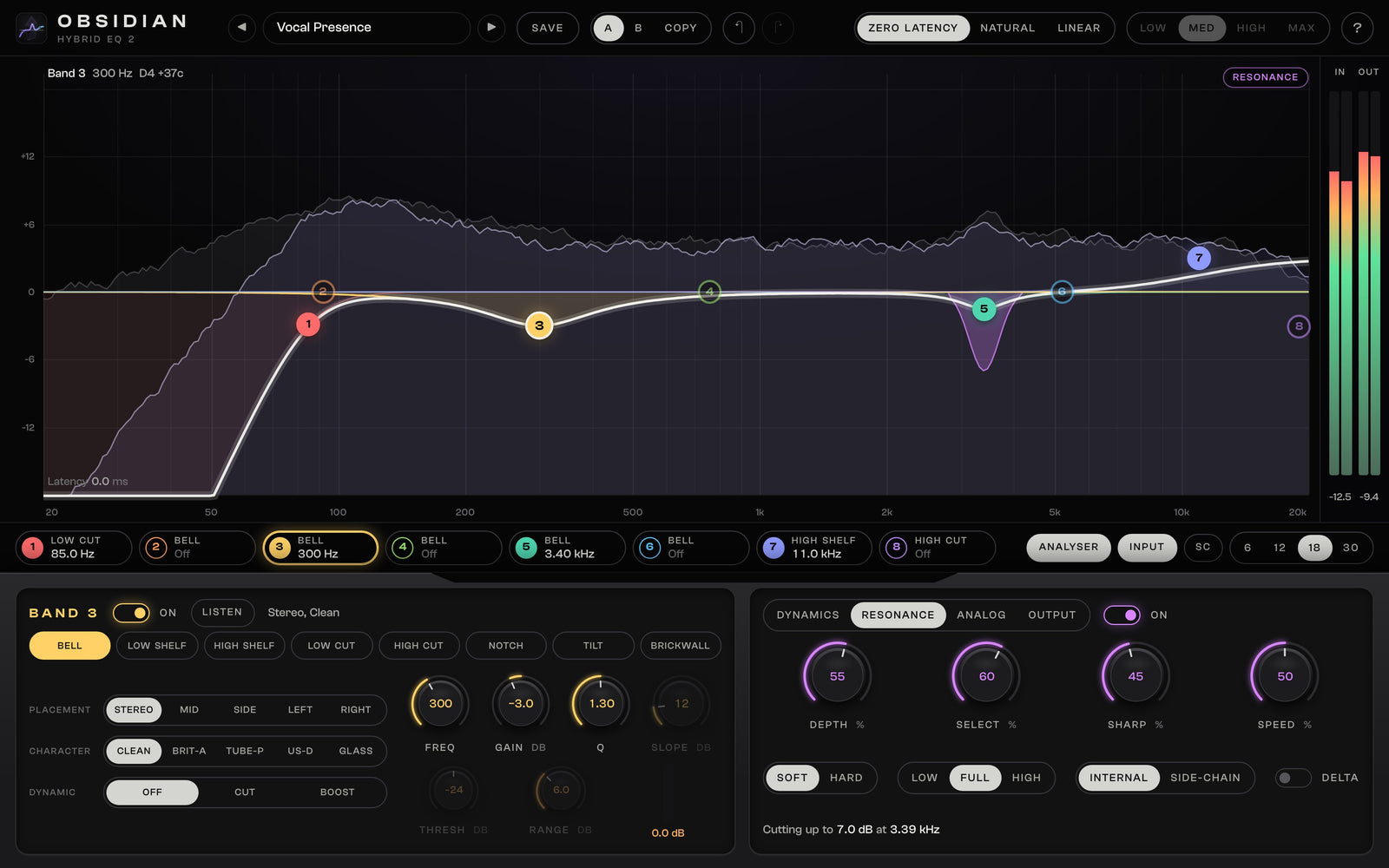
Resonance suppressor
Tame ringing peaks while they ring
A harsh note in a vocal, a whistle in a distorted guitar, a boxy snare: the suppressor finds narrow peaks that stand out and turns them down only while they ring. Depth, selectivity, sharpness and speed, three ranges, a side-chain, and Delta to hear exactly what it removes. What it cuts is drawn on the curve.
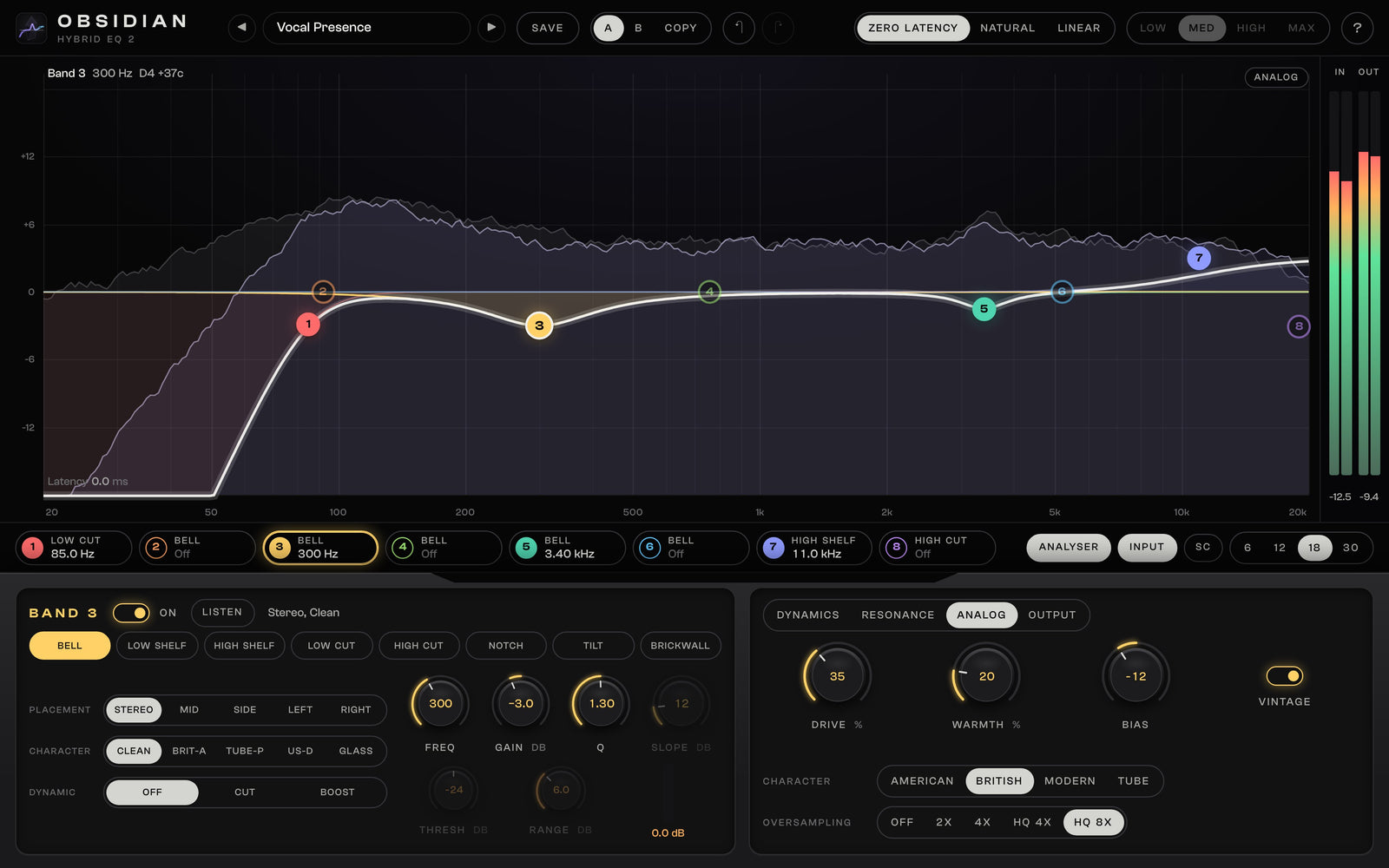
Analog colour
A console’s warmth, without the level jump
After the EQ, an analog stage with four console characters, drive, warmth, bias and a vintage voicing. Turning up drive adds colour, not loudness, so you hear what it does. Up to 8x oversampling keeps it clean at high settings. Each band can also react like a classic console band with five characters.
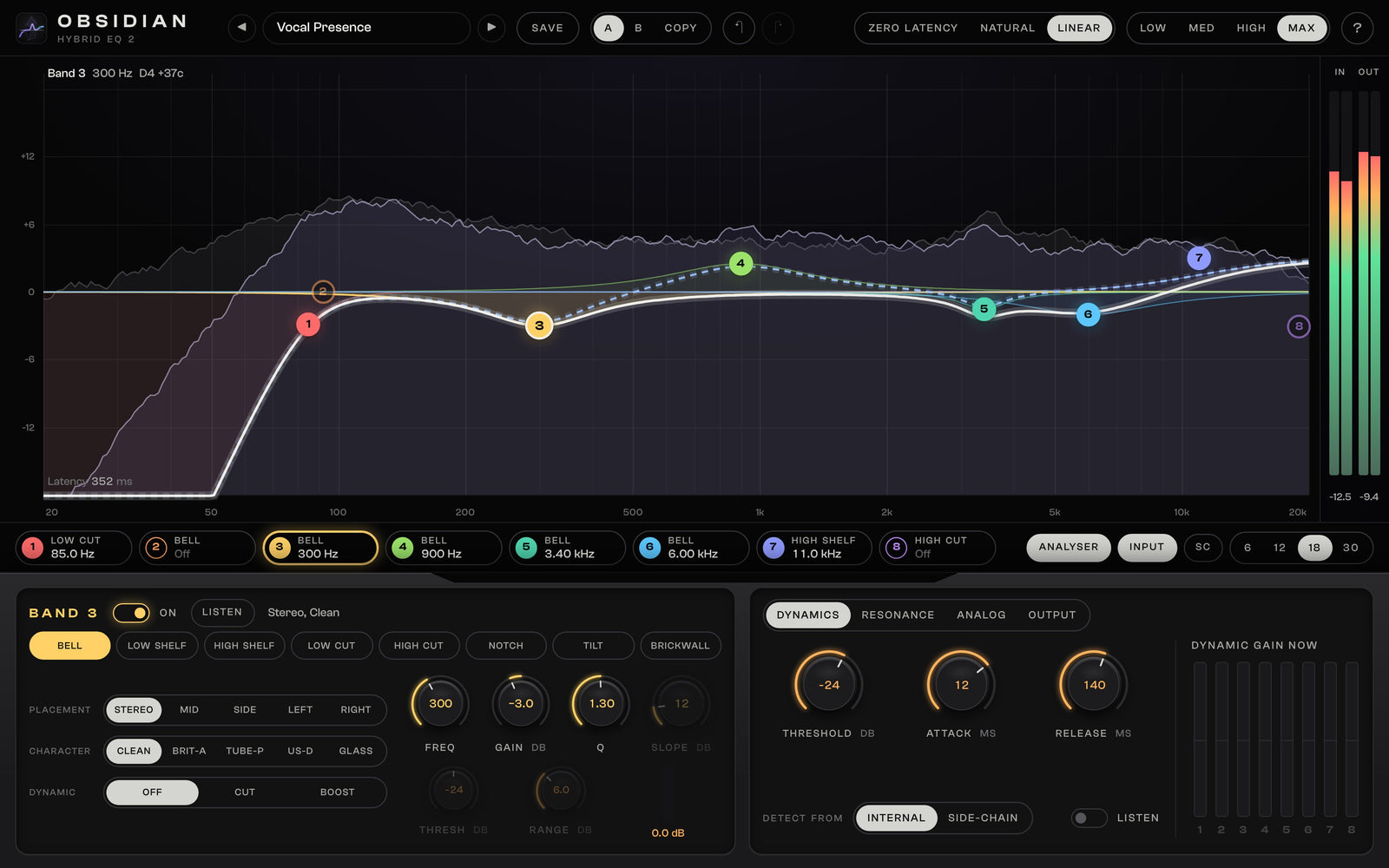
Phase modes
Zero latency, analog or linear: your choice
Zero Latency for tracking and mixing, Natural for an analog EQ’s phase at 0.7 ms, Linear for mastering and parallel buses with four resolutions. The latency shows on the curve and your DAW compensates it.
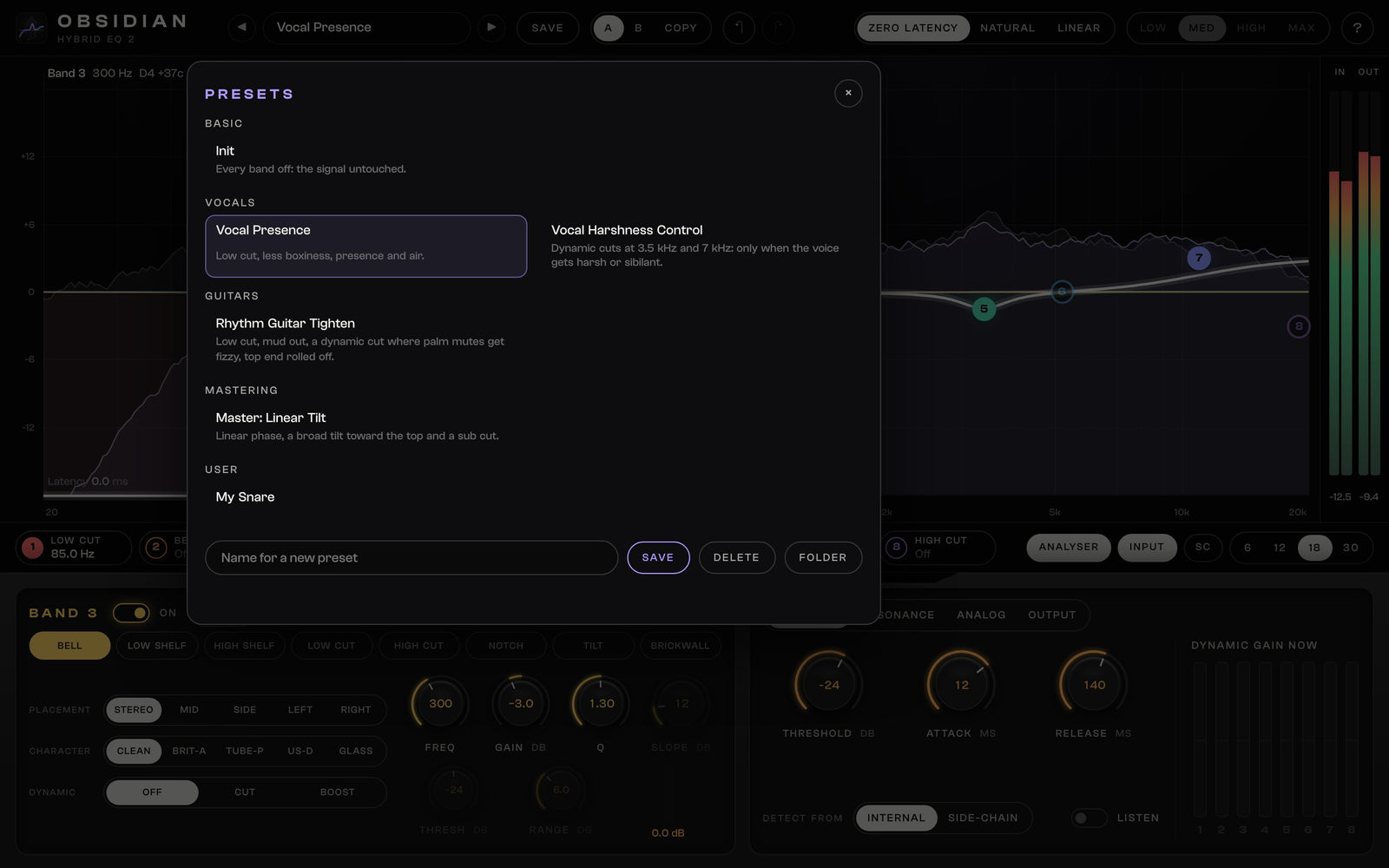
Presets
Start from a preset, compare with A / B
Twelve factory presets for vocals, guitars, bass, drums, the mix bus and mastering, plus your own. A / B holds two complete settings, auto gain keeps them at the same loudness, and undo goes back up to 100 steps.
Delivery and compatibility
In your DAW, on every track
- Formats
- VST3 and AU plugin
- Windows
- Windows 10 / 11, 64-bit · VST3
- macOS
- macOS 11 or newer, Apple Silicon (M1 or later) · VST3 and AU
- Not supported
- AAX (Pro Tools), Intel Macs
- Bands
- 8: bell, low and high shelf, low and high cut (6 to 96 dB per octave), notch, tilt, brickwall
- Phase modes
- Zero Latency, Natural (0.7 ms), Linear (four resolutions)
- In the download
- Windows installer, macOS installer and the User Guide (PDF)
- Owners of OBSIDIAN 1
- 30 % off at checkout on the account you bought it with; installs over version 1 and opens your projects
- Licence
- One-time purchase, instant download, no activation; included in the All-Access Pass
Questions
Frequently asked
What is OBSIDIAN 2?
OBSIDIAN 2 is an eight-band EQ for mixing and mastering. Every band is shaped like a band of a classic analog EQ (bell, shelves, cuts up to 96 dB per octave, notch, tilt, brickwall), any bell or shelf can be dynamic, and any band can work on the mid, the sides, the left or the right channel. A resonance suppressor and an analog colour stage complete it.
Does the sound really follow the curve?
Yes, and we measured it. Every phase mode plays the gain and shape you set: a +6 dB bell plays +6.00 dB in Zero Latency, Natural and Linear. In Zero Latency OBSIDIAN 2 stays within 0.1 dB of the analog curve right up to 20 kHz, also at 44.1 and 48 kHz, where zero-latency EQs usually bend high bands out of shape.
Which phase mode should I use?
Zero Latency for tracking and most mixing: no delay at all. Natural when you want the phase of an analog EQ too, for 0.7 ms of delay. Linear for mastering and parallel buses, where nothing may shift in time; it has four resolutions from 53 to 352 ms of delay at 48 kHz, which your DAW compensates.
I own OBSIDIAN 1. Is there an upgrade price?
Yes. Log in with the account you bought OBSIDIAN 1 with and 30 % comes off OBSIDIAN 2 at checkout automatically. There is no code to enter. Your OBSIDIAN 1 downloads stay in your account.
Will my OBSIDIAN 1 projects open?
Yes. OBSIDIAN 2 installs in place of OBSIDIAN 1 under the same name, so your DAW loads it in your old projects with all their settings. Bells in Natural and Linear mode, which OBSIDIAN 1 played at about half their gain, are opened at the gain you actually heard, so your mixes sound the way you left them.
Which formats and systems does it run on?
VST3 on Windows 10 and 11 (64-bit), and VST3 and Audio Unit on macOS 11 or newer on Apple Silicon (M1 or later). Intel Macs and Pro Tools (AAX) are not supported. The download includes installers for Windows and macOS and the User Guide.
Is there a standalone app?
No. OBSIDIAN 2 is a plugin for your DAW. When you install it over OBSIDIAN 1, the old standalone app is removed.
What does the resonance suppressor do?
It finds narrow peaks that ring out of their neighbourhood, like a harsh note in a vocal or a whistle in a distorted guitar, and turns them down only while they ring. Delta lets you hear exactly what it removes.
Does it need activation or an internet connection?
No. There is no licence key and no online activation. Install it and mix.
OBSIDIAN 2
Draw the curve. Hear exactly that.
Develop Device All-Access Pass
Why buy one plugin at a time?
One annual pass unlocks the entire Develop Device catalogue, plugins, presets, DAW templates, drum MIDI, cabinet IRs and amp profiles, including this product, plus everything new I release this year. A fraction of buying it piece by piece.
- Every Develop Device plugin & app, including this one
- Serum 2 & Vital synth preset toolkits
- Superior Drummer 3, EZdrummer, GGD, MODO & Addictive Drums presets
- DAW templates for Cubase, Studio One & Reaper, plus 30K+ drum MIDI
- Cabinet IRs, NAM profiles & presets for Fractal, Kemper & Ampero
- Quad Cortex captures, shared straight to your Cortex Cloud
- Every new Develop Device release during your active year
- What you unlock stays downloadable, even after your year ends