


For decades, the sound of a Solid State Logic (SSL) console has been the gold standard in music production, an undisputed titan in the history of recorded music. From the punchy, aggressive dynamics that defined the sound of 80s rock to the famously musical and precise EQ that shaped 90s pop, the SSL 4000 series consoles have sculpted the sound of countless hit records. That iconic sound is defined by its channel strip: a vertical slice of the console containing all the processing for a single track: a characterful preamp, versatile high and low-pass filters, a legendary dynamics section, and a world-class EQ. It was a complete sonic toolkit, replicated on every channel.
Today, you don't need a six-figure console and a dedicated machine room to get that legendary workflow and sound. The digital revolution has democratized music production, and dozens of software companies have painstakingly modeled these coveted channel strips in the form of plugins. But with so many options from Waves, Universal Audio, Brainworx, and even SSL themselves, a crucial question arises: which emulation truly captures the magic, and which one is the best for you?
In this expanded shootout, I'll take a deep dive into the most popular SSL channel strip plugins on the market. I'll move beyond the spec sheets to compare their sonic character, unique features, and workflow philosophy to help you find the perfect one to become the centerpiece of your digital studio.
Best Channel Strip Plugin in 2026: The Short Answer
If you only want the verdict, here it is before the detail. These are the four SSL channel strip plugins compared in this article, and the one job each of them is best at.
Plugin |
EQ / dynamics models |
Stands out for |
Pick it if |
|---|---|---|---|
SSL Native Channel Strip 2 |
Switchable E and G |
Official SSL design, built-in EQ analyzer |
You want one strip that covers both console flavours |
Brainworx bx_console SSL 4000 E & G |
E or G, separate plugins |
Tolerance Modeling Technology across channels |
You are chasing the width and depth of a real desk |
Waves SSL EV2 Channel |
E-Series only |
Low CPU load, preamp saturation, oversampling |
You need it on dozens of tracks at once |
UA SSL 4000 E Channel Strip |
E-Series, Black and Brown knob |
Unison preamp on Apollo hardware |
You track through UA hardware and want it on the way in |
My own order, and why: for mixing work I reach for the SSL Native Channel Strip 2 first, because switching between E and G on the same track answers the question faster than opening a second plugin. When a mix needs to sound wider and less digitally identical from track to track, I move to Brainworx bx_console for its per-channel variation. The Waves SSL EV2 is what ends up on large sessions where CPU headroom decides the tool. The UA SSL 4000 E earns its place at the tracking stage rather than the mixing stage, because Unison is the part you cannot get in software alone.
The full head-to-head comparison table is further down, and each plugin is covered in detail below.
SSL Channel Strip Names: What People Are Actually Searching For
Half the confusion around these plugins is naming, so here is the map before the detail. Each of these strips is sold under a name that almost nobody types into a search box.
- SSL Channel Strip 2 or just Channel Strip 2 means Solid State Logic's own SSL Native Channel Strip 2. There is no separate product called Channel Strip 2, and the maker is SSL itself, not a third-party modeller.
- UAD SSL channel strip means the UA SSL 4000 E Channel Strip Collection. UAD is the plugin platform, so both names point at the same thing.
- Waves SSL channel strip, Waves SSL Channel and Waves SSL E-Channel all point at the Waves SSL EV2 Channel, the current version of the E-Channel that Waves has shipped for years.
- SSL 4000 E, 4K E, SSL E Series and SSL console channel strip are the same desk: the SSL 4000 E, whose channel strip is what the emulations here are modelled on. The E and G letters are the EQ generation, not the manufacturer.
- SSL channel strip VST is not a separate product either. Every strip in this shootout is one plugin delivered in the desktop formats a DAW loads, so the thing to check on a product page is which formats it lists, not whether a VST edition exists.
Table of Contents
- Best Channel Strip Plugin in 2026: The Short Answer
- SSL Channel Strip Names: What People Are Actually Searching For
- What Makes the SSL Sound So Special?
- SSL E Channel vs G Channel: Which EQ Do You Need?
- The Contenders
- SSL Native Channel Strip 2 Review: What You Get
- SSL Native Channel Strip 2 vs 4K E Emulations
- Honorable Mentions: More SSL Plugins Worth Trying
- Free and Cheap SSL Channel Strip Options
- SSL Channel Strip Hardware: The 4000 E Console and Budget Alternatives
- Head-to-Head Comparison
- Conclusion
What Makes the SSL Sound So Special?
Before I dive into the plugins, let's explore in greater detail what makes the SSL sound so enduringly desirable. It's a combination of three key elements working in perfect harmony.
-
The Punchy VCA Compressor: The dynamics section is famous for its fast, grabby VCA (Voltage Controlled Amplifier) compressor. Its default attack time is incredibly fast (around 3ms), making it perfect for taming unruly transients and adding "smack" to drums. Pushed hard, it can make a snare drum feel like it's jumping out of the speakers. On bass guitar, it can even out the performance, ensuring every note is solid and present. The gate/expander is equally legendary for its speed and ability to clean up drum bleed or tighten up sloppy guitar riffs with surgical precision. Many engineers use the expander setting with a fast release to add even more punch to drum shells, exaggerating the initial transient before the gate closes.
-
The Musical and Flexible EQ: SSL consoles came with two main EQ flavors, each with its own devoted following:
-
E-Series: The original "Black Knob" EQ (from the SL 4000 E) is known for being more aggressive and colored. It features a "proportional Q" design on the two mid-bands, meaning the bandwidth (Q) becomes narrower as you boost or cut more aggressively. This makes it incredibly intuitive; small boosts are broad and musical, while large, surgical cuts become automatically tighter and more focused. It's the EQ you reach for when you want to add serious grit and character.
-
G-Series: The later "Pink/Orange Knob" EQ (from the SL 4000 G) offers slightly different filter curves and frequency ranges, often considered more "surgical" and modern-sounding. The Q is not proportional, and the curves are generally broader, leading some engineers to feel it's better for gentle shaping and overall tonal balance. The famous "SSL trick" of boosting and cutting the same low-mid frequency (e.g., boosting at 250Hz for body and cutting at 250Hz to remove mud) works brilliantly on both, but each EQ achieves the effect with a slightly different flavor.
-
-
Total and Immediate Workflow: Having a filter, gate, compressor, and EQ for every single channel, all laid out identically, was revolutionary. It encouraged quick, decisive mixing. Instead of stopping to patch in external gear, engineers could make sonic decisions instinctively, which led to a more cohesive "console sound." The routing was also brilliant, allowing you to place the EQ before the dynamics for a more reactive compression, or after for sculpting the compressed signal. You could even route the filters into the compressor's sidechain to prevent low-end from triggering the compression, a standard technique today that was built right into the desk.
SSL E Channel vs G Channel: Which EQ Do You Need?
This is the single most common question about SSL channel strips, and the answer decides which plugin you buy, because some of them only give you one of the two.
Pick the E-Series when you want character. The proportional-Q mid bands tighten up as you push them, so a big boost stays usable and a deep cut gets focused on its own. It is the more aggressive of the two, and it is the one I use on drums, on distorted guitars, and anywhere a track has to cut through rather than sit politely.
Pick the G-Series when you want control. The curves are broader and the Q does not change with gain, which makes it easier to shape overall tone without narrowing in on one spot. It suits buses, acoustic sources, and vocals that need balancing rather than attitude.
The dynamics differ too, not just the EQ: the E-Series VCA is the faster, grabbier one, while the later G-Series behaviour is a little gentler. If you cannot decide, that is an argument for a plugin that switches between both models rather than one that fixes you to a single revision. Of the four compared here, only the SSL Native Channel Strip 2 does that inside one instance; Brainworx sells the E and the G as separate plugins, and Waves and UA cover the E-Series.
The Contenders
I'm putting four of the most respected SSL emulations under the microscope. Each has a unique take on the classic formula.
1. Waves SSL EV2 Channel
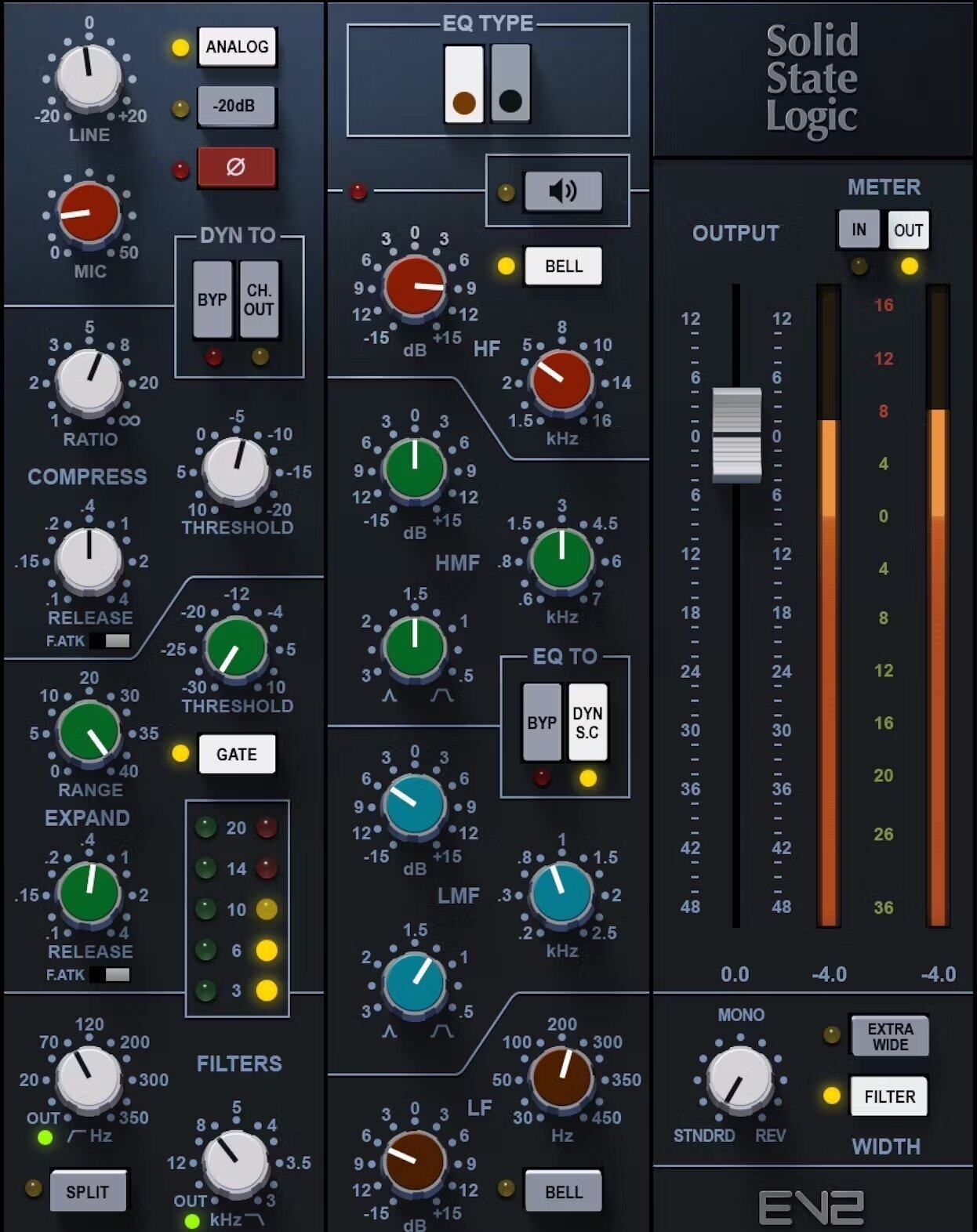
The Veteran Workhorse, Reborn.
Waves was one of the first companies to model the SSL 4000 E, and their original plugin became an industry standard for its low CPU usage and instantly recognizable sound. The new SSL EV2 is a complete ground-up redesign, featuring new, more sophisticated modeling of the original "Black Knob" E-Series console owned by legendary producer Jack Joseph Puig (U2, The Rolling Stones, Lady Gaga).
-
GUI & Workflow: The EV2 is clean and modern while staying true to the original layout. It's easy to navigate and logically laid out. It's a single plugin that focuses purely on being the best E-Series emulation it can be, without the complexity of switchable models.
-
Sound: The EV2 is significantly punchier and more detailed than its predecessor. The new preamp saturation section is a highlight, adding a pleasant, warm grit when pushed. This isn't just a distortion knob; it models the harmonic complexity of the original hardware's input stage. The EQ is fantastic for aggressive boosts that don't sound harsh, perfect for adding air to vocals or crack to a snare. The dynamics section has that classic, grabby SSL "smack" and excels at shaping transients on drums and bass.
-
Special Features:
-
Mic Preamp Saturation: You can drive the input to get harmonically rich distortion, ranging from subtle warmth to noticeable crunch.
-
Oversampling: Built-in oversampling (up to 8x) helps reduce digital aliasing, especially when driving the saturation hard, resulting in a cleaner, more analog-like top end.
-
Focus on E-Series: It doesn't switch to G-Series. Waves' philosophy here is to perfect one specific, highly-coveted sound, and they've nailed it.
-
-
Best For: Mixers who want a reliable, CPU-efficient, and great-sounding E-Series channel strip for daily use. If you need to instantiate a plugin across 60 tracks without bringing your computer to its knees, the EV2 is an unbeatable workhorse.
2. Universal Audio SSL 4000 E Channel Strip Collection
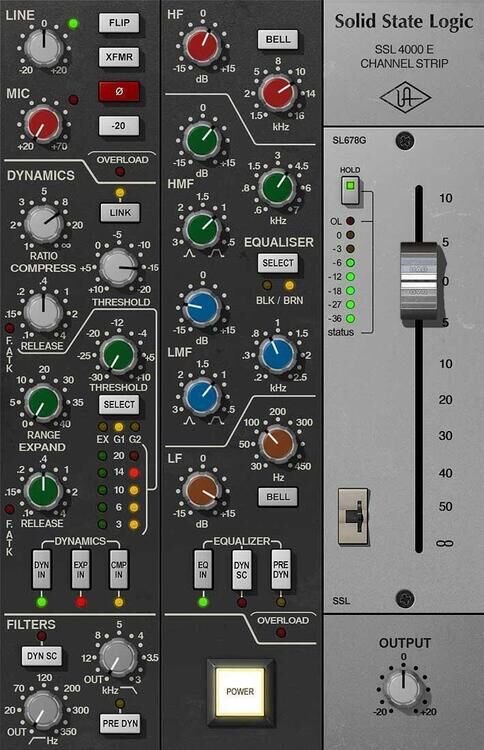
The DSP-Powered Authentic Classic.
Universal Audio is renowned for its hyper-realistic analog emulations that run on dedicated UAD-2 and Apollo DSP hardware. Their SSL 4000 E Channel Strip is a long-standing favorite among UAD users and was developed in an end-to-end partnership with Solid State Logic.
-
GUI & Workflow: The GUI is a photorealistic recreation of the hardware, which will feel instantly familiar to anyone who has touched an SSL console. The workflow is identical to the real thing, including the ability to change the signal path order (e.g., placing the EQ before or after the dynamics) with the classic "CH OUT" button.
-
Sound: UAD's SSL emulation is known for its incredible depth, width, and accuracy. The EQ curves and compressor behavior feel incredibly close to the hardware. It includes both the "Black Knob" E-Series and the earlier, rarer "Brown Knob" EQ revisions, offering distinct sonic flavors. The real magic, however, comes from the Unison-enabled preamp, which sounds fantastic when driven and interacts with your microphone in a uniquely realistic way.
-
Special Features:
-
Unison™ Technology: This is UA's killer feature. When used with an Apollo interface, it physically reconfigures the interface's preamp to match the impedance, gain staging, and circuit behaviors of the original hardware. This means your microphone interacts with the preamp just as it would with the real console, a level of realism that can't be achieved with software alone. For another take on analog preamp character, see my Behringer 1273 review.
-
DSP-Powered: Runs on UAD hardware, freeing up your computer's CPU for other tasks. This is a massive benefit for large sessions but requires investment in the UAD ecosystem.
-
Multiple Revisions: Includes both the iconic E-series "Black Knob" and the slightly warmer, gentler "Brown Knob" EQ models.
-
-
Best For: Producers and engineers invested in the UAD ecosystem who demand the highest level of hardware authenticity, especially during the tracking phase, thanks to the Unison preamp integration.
3. Brainworx bx_console SSL 4000 E & 4000 G

The King of Analog Realism.
Brainworx, under the Plugin Alliance banner, took console emulation to the next level with their patented Tolerance Modeling Technology (TMT). Instead of modeling a single, "perfect" channel, TMT models the tiny, component-level variations (in resistors, capacitors, etc.) that exist between every single channel on a real analog console.
-
GUI & Workflow: The Brainworx plugins offer a familiar SSL layout but are enhanced with powerful digital-only features. The interface is clean and allows you to switch between E and G series models within the same plugin family.
-
Sound: This is where TMT creates its magic. By assigning different TMT "channels" to your tracks, you introduce subtle, non-linear sonic variations in frequency response, filter curves, and compressor timing. This breaks up the sterile perfection of digital audio and creates the depth, width, and three-dimensional soundfield of a real console, where every channel is unique. The core modeling is excellent on its own, but TMT is what makes it sound like a "mix," not just a collection of processed tracks.
-
Special Features:
-
Tolerance Modeling Technology (TMT): Simulates the variance of up to 72 different console channels. This is its unparalleled killer feature for achieving true analog console sound.
-
THD & Virtual Gain: Add extra harmonic saturation with the THD control or drive the input for grit. For even more creative saturation options, explore my FabFilter Saturn 2 tips for rock and metal. The Virtual Gain control lets you manage the modeled noise floor for a clean modern sound or an authentic vintage hiss.
-
Digital Add-ons: Modern necessities like a compressor Mix knob for instant parallel compression (a technique I explore in depth in my Distressor compressor guide), a secondary release option on the compressor, and a continuously variable High-Pass Filter add flexibility the original hardware never had.
-
-
Best For: Mixers who want to replicate the true analog console experience, complete with the subtle, beautiful imperfections that create a cohesive, deep, and three-dimensional sound. It's for those who obsess over analog realism and the "sound of a desk."
4. Solid State Logic SSL Native Channel Strip 2
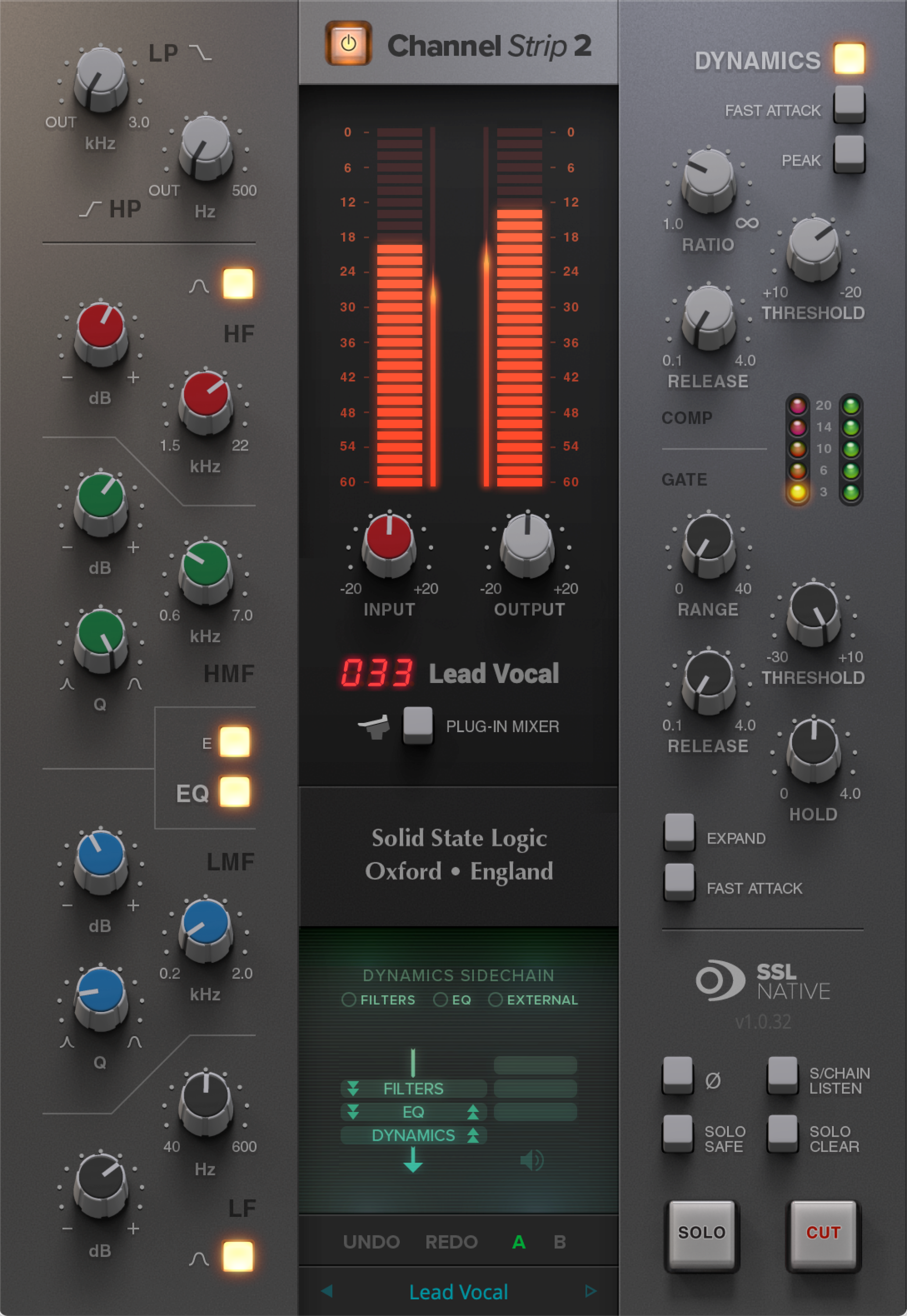
The Official Modern Take.
Who better to make an SSL plugin than SSL themselves? The SSL Native Channel Strip 2 is the company's own official software recreation. It's arguably less about slavish vintage emulation and more about delivering the pristine SSL workflow and sound in a modern, highly flexible plugin.
-
GUI & Workflow: The interface is clean, modern, and fully resizable, making it sharp on any display. It's clearly an SSL, but it's designed for the screen first. It features a fantastic real-time spectrum analyzer built directly into the EQ section, which is incredibly useful for visually identifying problem frequencies.
-
Sound: The SSL Native plugin sounds clean, precise, and powerful. It perfectly captures the fundamental character of both the E-Series and G-Series EQ and dynamics, allowing you to switch between their distinct characters with a single click. Some might say it sounds less "colored" or "vintage" than the other emulations, but this is pure, unadulterated SSL power. It's the sound of a brand-new SSL, not a 40-year-old one.
-
Special Features:
-
Switchable E & G Series Models: Get the aggressive punch of the E-Series EQ and the refined curves of the G-Series EQ in one plugin. The dynamics section also switches between the classic E-series VCA and the later G-series VCA models.
-
Modern Workflow: Features like an external sidechain input for the dynamics and the invaluable EQ spectrum analyzer make it perfect for modern, fast-paced production.
-
Official SSL Seal of Approval: It's designed and endorsed by the same engineers who design their legendary analog and digital hardware today.
-
-
Best For: Anyone looking for a versatile, modern, and official SSL channel strip. It's perfect for those who want the authentic SSL sound and workflow in a clean, high-fidelity package, without the heavy "vintage" coloration of some emulations.
SSL Native Channel Strip 2 Review: What You Get and Where It Stops
Because "SSL Native Channel Strip 2 review" is what most people actually type, here is the honest short version rather than a feature list repeated from the box.
What it does well. It is the only strip in this comparison that puts both the E and G models under one switch, so an A/B that would otherwise mean swapping plugins takes a click. The EQ spectrum analyzer sits behind the curve, which makes finding a resonance faster than sweeping for it by ear. The interface is fully resizable, which matters more than it sounds on a high-resolution display. And an external sidechain input on the dynamics is there, which the original hardware channel could only fake through the console routing.
Where it stops. There is no dedicated preamp drive control, so if the sound you are after is a pushed input stage rather than EQ and compression, this is not the plugin that gets you there: the Waves EV2 and the Brainworx THD control both do. It is also deliberately clean. It sounds like a new SSL rather than a forty-year-old one, and if what you want from an emulation is age and noise, you will find it undercoloured.
Who it is for. If you are buying one SSL strip and you want the official one, with both console flavours and a modern workflow, this is the straightforward answer. If you are buying a second one to add colour next to it, look at Brainworx.
SSL Native Channel Strip 2 vs 4K E Emulations
This is the choice most people are really making: take the strip SSL builds today, or take somebody else's model of the 4000 E desk. Those are two different goals, not two grades of the same thing.
SSL Native Channel Strip 2 is SSL's current design. It carries both the E and the G EQ in one plugin and adds tools the original desk never had, so it behaves like a modern mixing strip that happens to come from the company that built the console. Nothing in it tries to sound like one particular serial number.
The 4K E emulations go the other way. Brainworx bx_console SSL 4000 E models the tolerances of individual channels, Waves SSL EV2 keeps the E-Channel light enough to run everywhere, and the UA SSL 4000 E collection can sit in front of the converters on Apollo hardware. All three aim at the character of that specific desk.
How I decide in practice: when a track needs a decision made quickly, the Native strip wins, because both EQ voicings are one click apart and I never reopen the plugin picker. When a mix is technically fine but sounds flat and same-y from track to track, that is when an emulation with per-channel variation earns the extra CPU. Neither of those is a verdict on which one sounds better; it is a verdict on which question the plugin answers.
Honorable Mentions: More SSL Plugins Worth Trying
While the four contenders above represent the most popular and critically acclaimed SSL emulations, several other options deserve a mention for those exploring the full landscape of SSL channel strip plugins in 2026:
Slate Digital Virtual Mix Rack (VMR) SSL Module: Part of Slate Digital's modular mixing environment, this SSL-style module integrates into the VMR framework alongside other console emulations. It is a good option if you are already subscribed to Slate All Access, as it is included at no extra cost.
Lindell Audio 80 Series: A less well-known but excellent SSL 4000 emulation available through Plugin Alliance. It features a clean, no-frills interface and faithful modeling of both the E and G series dynamics and EQ sections. Worth auditioning if you want an alternative to the Brainworx version.
Harrison Mixbus 32C: While not technically an SSL plugin, Harrison's Mixbus DAW and its channel strip are worth mentioning. Harrison was a direct competitor to SSL in the console era, and their Mixbus 32C channel strip offers a similar "console workflow" philosophy with its own distinct sonic character. If you enjoy the SSL workflow but want to explore a different console flavor, Harrison is a compelling alternative.
Free and Cheap SSL Channel Strip Options
There is no free version of the plugins above, and it is worth being straight about what the free route can and cannot give you.
Trials are the real free option. Every developer in this shootout offers a time-limited demo of the full plugin. That is the only way to hear an SSL strip on your own material with nothing removed, and it is more useful than any review, including this one.
Donationware console strips exist. Independent developers such as Analog Obsession publish console-style channel strips at pay-what-you-want pricing. They are not licensed SSL emulations and they are not modelled to the same depth, but they do give you a filter, EQ and dynamics in one window laid out the console way, which is most of what changes how you mix.
Your DAW already has a strip. Before spending anything, chain the stock EQ, gate and compressor into one preset in the console order. It will not sound like an SSL, but it will tell you whether the workflow is what you were missing, which is a cheaper question to answer first.
Where free stops: the saturation behaviour of the input stage, the per-channel variation that makes a desk sound like a desk, and the exact compressor timing are the parts that cost money to model, and they are the parts you notice on a full mix rather than on a solo track.
SSL Channel Strip Hardware: The 4000 E Console and Budget Alternatives
All of the above are emulations of one thing: a channel from an SSL 4000-series console. On the original desk, the strip was not a product you bought on its own, it was a vertical slice repeated across every channel, with a mic preamp, high and low-pass filters, a gate/expander, a VCA compressor and the EQ. That is why these plugins are laid out the way they are, and why the order of the sections matters when you use them.
SSL still builds hardware, and a 4000-series console remains out of reach for a home studio, which is exactly why the plugin market for it exists. If what you want is real analog gain staging in a single rack unit rather than a console, the honest budget entry point is a hardware channel strip from another maker: it will not be an SSL, but a preamp, compressor and EQ in one box does the same job in the signal chain. I looked at one of the cheapest routes into that in my Behringer 676 review, and at a Neve-flavoured preamp alternative in the Behringer 1273 review.
My take: if you already work in the box, a plugin strip will change your mixes more than an entry-level hardware strip will, because you can put it on every track instead of one.
Head-to-Head Comparison
|
Feature |
Waves SSL EV2 |
UA SSL 4000 E |
Brainworx SSL 4000 |
SSL Native Channel Strip 2 |
|---|---|---|---|---|
|
EQ Models |
E-Series Only |
E-Series (Black & Brown) |
E or G (Separate Plugins) |
Switchable E & G |
|
Dynamics |
E-Series |
E-Series |
E or G |
Switchable E & G |
|
Key Technology |
New "EV2" Modeling |
Unison™ Preamp, DSP |
Tolerance Modeling (TMT) |
Official SSL Digital Design |
|
Preamp Saturation |
Yes |
Yes (via Unison) |
Yes (THD Control) |
No dedicated drive |
|
Modern Features |
Oversampling |
DSP Integration |
Comp Mix, Cont. HPF, TMT |
EQ Analyzer, Ext. Sidechain |
|
CPU Usage |
Low |
N/A (DSP-based) |
Medium-High |
Low-Medium |
|
Unique Selling Point |
Simplicity, efficiency, great new modeling. |
Hardware authenticity and Unison preamp. |
Unmatched analog console realism via TMT. |
Official, clean, modern, and versatile. |
Conclusion: The Right Tool for the Right Philosophy
As with all things in audio, there is no single "best" SSL channel strip plugin. The right choice depends not just on your budget, but on your entire workflow and sonic philosophy. Each of these plugins is exceptional, but they excel in different areas.
-
If you need a CPU-friendly, reliable workhorse that sounds fantastic and lets you build massive mixes without fear of overloading your system, the Waves SSL EV2 is a phenomenal choice. It's the definition of a professional tool that gets the job done.
-
If you're in the Universal Audio ecosystem and crave the most authentic hardware feel, especially for tracking vocals and instruments through a "real" preamp, the UA SSL 4000 E is unbeatable in its realism.
-
If your ultimate goal is to achieve the most realistic analog console sound with all the subtle, three-dimensional nuances of a real desk breathing life into your mix, the Brainworx bx_console SSL series with TMT is simply in a class of its own.
-
If you want the official SSL sound in a clean, modern, and versatile package that combines the best of both the E and G series with modern tools, the SSL Native Channel Strip 2 is the perfect, forward-thinking solution.
The best advice? All of these companies offer free trials. Don't just read about them; use them. Set up a real mix session. Take a drum bus, a lead vocal, and a bass guitar. On each, instantiate one of the plugins and try to achieve a specific goal (e.g., "add punch and presence"). Notice how differently you have to work with each plugin. Listen to how different the final result sounds, even when aiming for the same target. One of them will just click with the way you hear music. Whichever you choose, you'll be harnessing a piece of music history that can bring punch, clarity, and undeniable character to your productions.
Want real analog channel strip character instead of plugins? Check out the Behringer 676 tube channel strip, a budget-friendly hardware alternative with tube warmth and 1176-style compression.
Frequently Asked Questions
What is the best SSL channel strip plugin?
It depends on what you need it for. The SSL Native Channel Strip 2 is made by Solid State Logic themselves and is the most versatile, because it switches between the E and G models in one plugin. The Brainworx bx_console SSL 4000 E and 4000 G go furthest on analog realism thanks to Tolerance Modeling Technology, which varies the modelling from channel to channel. The Waves SSL EV2 Channel is the CPU-efficient workhorse, and the UA SSL 4000 E Channel Strip is the one to have if you track through Apollo hardware and want the Unison preamp. Each offers a slightly different flavor of the classic SSL sound.
Is the Waves SSL worth it in 2026?
The Waves SSL E-Channel and G-Channel plugins are still useful mixing tools, especially when purchased on sale. While they are older emulations and lack the analog modeling depth of newer competitors like the Brainworx or Plugin Alliance SSL offerings, they are CPU-efficient and deliver that recognizable SSL punch. At full price, newer alternatives offer better value, but on sale they remain a solid addition to any plugin collection.
What does an SSL channel strip do?
An SSL channel strip plugin emulates the signal processing found on each channel of a Solid State Logic mixing console. It typically includes a parametric EQ, a compressor/limiter, a gate/expander, and sometimes a filter section -- all modeled after the original analog circuitry. The key advantage is that these processors are designed to work together in a single signal chain, providing the cohesive "glue" and musicality that SSL consoles are famous for.
Can SSL plugins replace hardware?
Modern SSL plugin emulations have reached a level of quality where they can produce mix results that are virtually indistinguishable from the hardware in a blind test. While purists may argue that analog hardware adds subtle harmonic richness that plugins cannot fully replicate, the practical difference in a full mix context is negligible. For the vast majority of producers and mix engineers, SSL plugins deliver professional results at a fraction of the cost, size, and maintenance of the real hardware.
Is there a free SSL channel strip plugin?
Not an officially licensed one. Solid State Logic, Waves, Brainworx and Universal Audio all sell their channel strips, though each offers a time-limited free trial of the full version. Console-style strips from independent developers are available as donationware, and they will give you the layout and the workflow, but not the licensed modelling of a specific SSL revision.
What is the SSL 4000 E channel strip?
It is one channel of the Solid State Logic 4000 E console: mic preamp, high and low-pass filters, gate/expander, VCA compressor and the "Black Knob" E-Series EQ, stacked in a single vertical strip and repeated across every channel of the desk. The plugins in this article are software recreations of that strip, which is why they share the same section order.
Does Behringer make a channel strip?
Yes, Behringer builds hardware channel strips rather than SSL plugins, and they are among the cheapest ways to get a preamp, compressor and EQ in one rack unit. They are not SSL emulations and do not claim to be. I covered one in my Behringer 676 review.
Is the SSL Channel Strip 2 the same as the SSL Native Channel Strip 2?
Yes. The full name of the product is SSL Native Channel Strip 2 and it comes from Solid State Logic itself, so searches for "SSL Channel Strip 2" and "Channel Strip 2" land on the same plugin, covered in the review section above.
Is there an SSL channel strip VST?
There is no separate VST edition of any of these strips. Each maker ships one plugin in the desktop formats a DAW loads, so the practical step is to open the maker's specification page and check that the format your DAW uses is on the list before buying.
Can I use an SSL channel strip on a stereo bus?
Yes, and that is a normal use for one. In most DAWs the instance follows the track you insert it on, so the setting worth checking on a stereo source is the compressor: whether both sides move together or each side reacts on its own decides how much the image narrows once the strip starts working.
Last reviewed: 23 August 2026.
Related Products
Check out my professional presets and templates:





Leave a comment
All comments are moderated before being published.
This site is protected by hCaptcha and the hCaptcha Privacy Policy and Terms of Service apply.